

Participant
August 27, 2021
Question

Change font of auto-generated TOC

  • August 27, 2021
  • 3 replies
  • 220 views

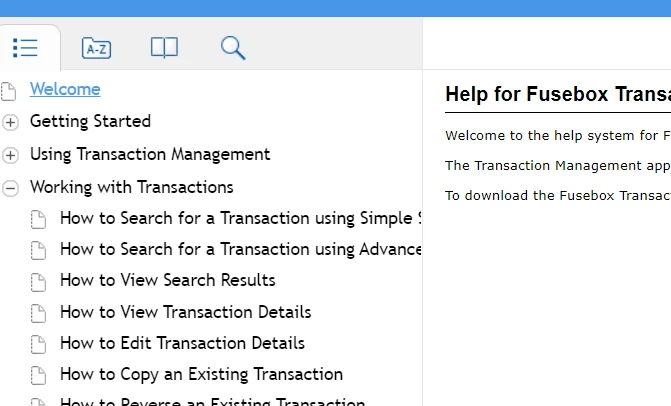
The TOC font on the Blue Azure skin is much larger than the text in the Help files.  How do I change that font type and size?


This topic has been closed for replies.

3 replies

Peter Grainge
Community Expert
Community Expert
August 27, 2021

Sorry, I omitted the link I meant. Change TOC, Index and Other Skin Fonts.

________________________________________________________
See www.grainge.org for free Authoring and RoboHelp Information

Use the menu (bottom right) to mark the Best Answer or Highlight particularly useful replies. Found the answer elsewhere? Share it here.
Peter Grainge
Community Expert
Community Expert
August 27, 2021

This link explains how to do that in both Classic and New UI versions of RoboHelp. You haven't said which you are using.

________________________________________________________
See www.grainge.org for free Authoring and RoboHelp Information

Use the menu (bottom right) to mark the Best Answer or Highlight particularly useful replies. Found the answer elsewhere? Share it here.
Vicki A.Author
Participant
August 27, 2021

I am using the 2020v.   I am not able to find info for changing the auto-generated TOC font and size, as you suggested.

Vicki A.Author
Participant
August 27, 2021

Also want to add that I am using RH 2020 with Patch 5.
