
August 18, 2011
Answered

Changing line colour of Webhelp

  • August 18, 2011
  • 1 reply
  • 731 views

hello again helpful peeps,

Just trying to change the colour of some lines in the webhelp. I have succesfully changed one of the lines (see diagram below) using the brilliant "Skinny on Skins" help, but now also need to change the one above it. Is it possible?
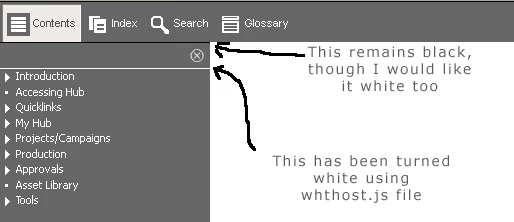
Thanks!

    This topic has been closed for replies.
    Correct answer Praful_Jain

    you need to edit the output of webhelp,

    Go to the webhelp output folder and open the file whskin_mbars.htm in notepad.

    search for <body tag and add the following style

    style="border-top: 1px solid red;"

    in case you want to make the border top as red color or make it any color you want.

    thanks

    Praful

    1 reply

    August 24, 2011

    does anybody have an idea about my question above?

    Thanks

    Praful_Jain
    Praful_JainCorrect answer
    Participating Frequently
    August 24, 2011

    you need to edit the output of webhelp,

    Go to the webhelp output folder and open the file whskin_mbars.htm in notepad.

    search for <body tag and add the following style

    style="border-top: 1px solid red;"

    in case you want to make the border top as red color or make it any color you want.

    thanks

    Praful

    August 25, 2011

    Thanks very much for your reply, this answers my question!

    Cheers,

    Paul