
Known Participant
May 18, 2010
Question

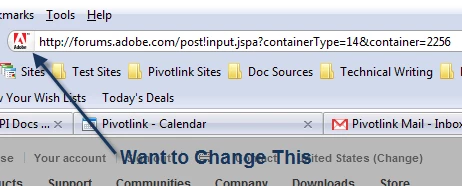
Changing the site identity icon to corporate logo

  • May 18, 2010
  • 1 reply
  • 481 views

I can't seem to dig this particular issue up in the webhelp or any other file, so here goes.

The site identity information logo seems to always come back to the global icon for Webhelp; I'd like to change that logo to my corporate logo, and for some reason can't wrap my brain around how to set that up in RoboHelp.

Anyone have a helper on this one, or am I staring at something without realizing what it is?
This topic has been closed for replies.

1 reply

Captiv8r
Legend
May 19, 2010

Hi there

That is something called a Favicon. WebHelp has a few of them. If you want all of them to reflect your company logo you should consider replacing all the seed icons with yours. You will typically find the seed icons in the following location:

<RoboHelp Installation Folder>\RoboHTML\WebHelp5Ext\template_skin

<RoboHelp Installation Folder>\RoboHTML\WildFireExt\template_stock

Replace the ico files with yours. Just use the same names Adobe does and your icons should populate right into any WebHelp or FlashHelp output.

I did find others, so just to be on the safe side you may need to  perform a search mission to locate all instances and replace them with yours.

Cheers... Rick

Helpful and Handy Links

RoboHelp Wish Form/Bug Reporting Form

Begin learning RoboHelp HTML 7 or 8 within the day - $24.95!

Adobe Certified RoboHelp HTML Training

SorcerStone Blog

RoboHelp eBooks