November 8, 2011
Answered

Changing the start page.

  • November 8, 2011
  • 2 replies
  • 1242 views

Hello community!

My first question has to be why Robohelp makes life so complicatingly frustrating!  Gaaaaah!!!!!!!!  Seriously, no other development program is so illogical or restrictive. Good thing I'm only using the trial becuase I'm having a hard time building a desire to use it, particularly when Madcap flare is so much easier to use.  Perhaps somebody can help me with that!

Moving on and take the Webhelp Settings, found only under the File menu item Generate.  I'm attempting to change the start page location for my webhelp project ('D'oh!').

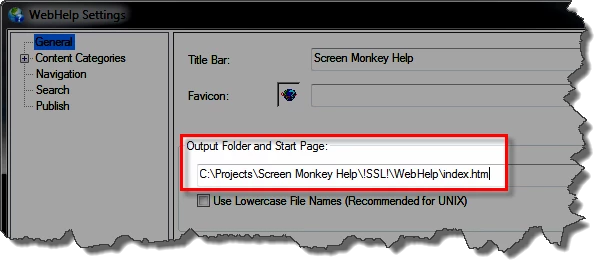
So, there it is, in the General tab, under Output and Start page, the field to define which page you want to display when loading the webhelp project. So I change the html file, click Save, hit Generate and viola! - no change!  No change using any other page either, and even positioning the html page into the first spot...nope. 

It couldn't be that easy could it?

So does anybody have idea how to actually change the start page for a Webhelp file?
This topic has been closed for replies.
Correct answer Captiv8r

Welcome to our community

Odd, many folks find RoboHelp actually simpler to use and understand than Flare.

First, let's ensure you aren't confusing the Start page with the Default topic. I'm assuming you are using RoboHelp HTML 9 here.

When you examine the Single Source Layout properties, you have the option to configure the name of the Start page.

The WebHelp start page is typically named Index.htm and is where you point the users to open the WebHelp. This page sets a cascade of events in motion. It divides the browser into different areas where each area loads different content for the Main Toolbar, Navigation Frame and so on. The last action is to load the Default Topic into the Topic Pane. What you are describing suggests you want to change the Default Topic.

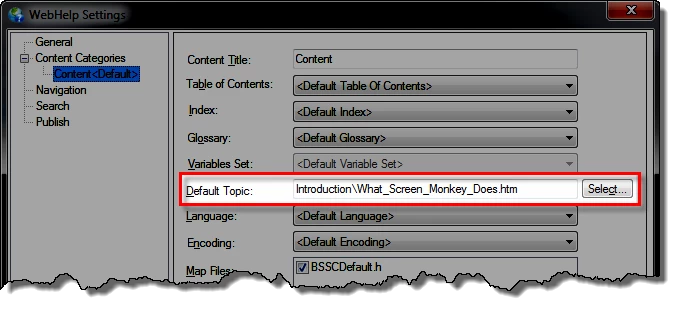
To change the Default Topic, expand the Content Categories section and select the default category. Then click the Select... button and nominate a new topic to become the default.

See if that helps sort things... Rick

Helpful and Handy Links

RoboHelp Wish Form/Bug Reporting Form

Begin learning RoboHelp HTML 7, 8 or 9 within the day!

Adobe Certified RoboHelp HTML Training

SorcerStone Blog

RoboHelp eBooks

2 replies

Community Expert
November 8, 2011

I'm finding the move from RH to Flare frustrating. Just what you're used to really.

You haven't said what version of RH you're using either so I'm going with RH7instructions.

What you need to do is go into the Single Source Layouts pod.

Right-click on the layout you are using for your help and select Properties.

Then you can change the start page.

(It's pretty much the same as going to Project Organiser and double-clicking on a Target. Imagine my trouble learning NOT to right-click and select Properties. )

Captiv8r
Captiv8rCorrect answer
Legend
November 8, 2011

Welcome to our community

Odd, many folks find RoboHelp actually simpler to use and understand than Flare.

First, let's ensure you aren't confusing the Start page with the Default topic. I'm assuming you are using RoboHelp HTML 9 here.

When you examine the Single Source Layout properties, you have the option to configure the name of the Start page.

The WebHelp start page is typically named Index.htm and is where you point the users to open the WebHelp. This page sets a cascade of events in motion. It divides the browser into different areas where each area loads different content for the Main Toolbar, Navigation Frame and so on. The last action is to load the Default Topic into the Topic Pane. What you are describing suggests you want to change the Default Topic.

To change the Default Topic, expand the Content Categories section and select the default category. Then click the Select... button and nominate a new topic to become the default.

See if that helps sort things... Rick

Helpful and Handy Links

RoboHelp Wish Form/Bug Reporting Form

Begin learning RoboHelp HTML 7, 8 or 9 within the day!

Adobe Certified RoboHelp HTML Training

SorcerStone Blog

RoboHelp eBooks

Community Expert
November 8, 2011

Oops, sorry didn't see you there Rick.