
Participant
February 21, 2018
Question

Changing URL does not change content

  • February 21, 2018
  • 1 reply
  • 252 views

I am having trouble navigating with a project that I regenerated from an old project for the benefit of the Chrome TOC showing on the left. Now I have the problem of the lack of navigation via the URL. When I change the URL it does not change the content of the window as shown below:
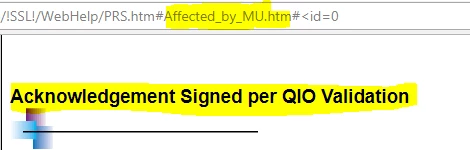
Navigating to "Affected By MU" in the URL does not yield the expected result of having the page showing with that title. Navigating via the browser address field does not affect the page as it did in the old project before I regenerated it. How do I recreate this functionality?

Any help will be greatly appreciated.

Thank you,

Preston

This topic has been closed for replies.

1 reply

Captiv8r
Legend
February 21, 2018

Perhaps try clearing the browser cache? Also, if you are able, delete the output files from the server and upload fresh?

Participant
February 22, 2018

I have tried clearing the cache and I regenerated the files to the server several times.

Captiv8r
Legend
February 22, 2018

Sooo, in your image:

It would appear you are using WebHelp. And it also appears that the link is pointing to a bookmark? I say that because of the pound or hash symbol after the PRS.htm.

How exactly are you changing the URL? Manually typing it? A hyperlink of some sort?

That link in the address bar seems quite odd. Based on the #<id=0, I'm guessing it may be a CSH call?

Cheers... Rick