I wanted to get to the bottom of this so I created a Word document with bookmarks. I found that Word would not let me add any bookmark with numbers in it so I am curious as to how you managed that?
The next thing I found was that on linking a document to a project, unless the document has a TOC the bookmarks don't get imported. Is that your experience?
Then I linked and found that the bookmarks in Word had been renamed to the text of the heading rather than what I had entered.
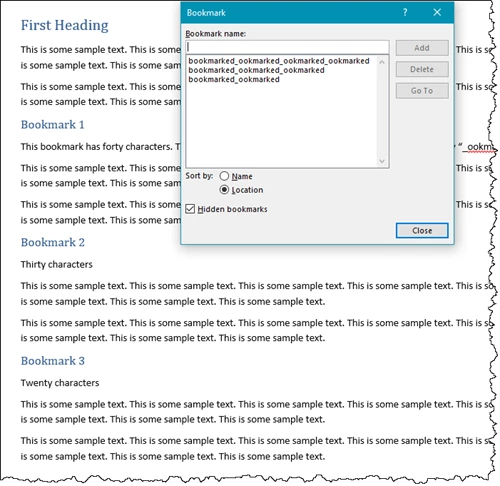
I then went back to the document and changed the headings so that they had forty, thirty and twenty characters.
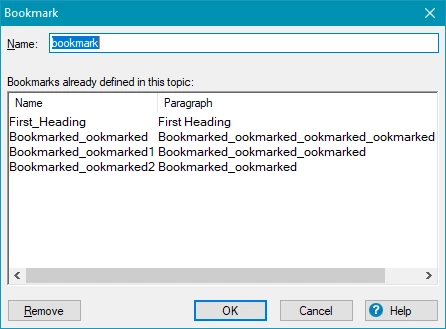
On updating the document I then got this in RoboHelp. The numbers are simply because each heading have the text I used. As you say, it gets clipped on linking. The logic of my headings was that "bookmarked" and "_ookmarked" both contain ten characters so I hoped to glean some information from that.
Finally I went back to the document and removed the underscores replacing them with B.
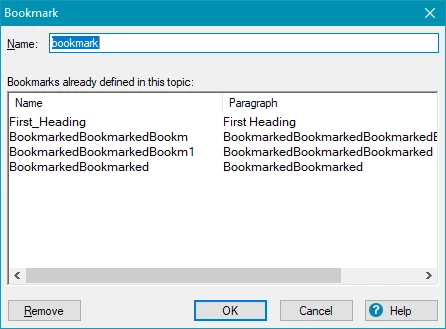
That confirmed beyond a shadow of doubt the limit is 25, albeit RoboHelp adds a number if a duplicate gets created and a further clipping occurs with underscores.
There is no setting I can find that allows you to change that number and so far I haven't found any way of changing how this works, other than the obvious limiting the headings in Word to 25 characters.



 AdChoices