
Chm breadcrumbs color blue after upgrading from RH8 to RH9
RH9, 9.0.1.232
My project uses breadcrumbs that are generated during compiling. In RH8, the breadcrumbs would be the a.link/a.visited/a.hover color, the links would be underlined, and the topic name + greater than characters would be black. Now, the links are not underlined anymore, and the topic name + greater than characters have changed to blue, which looks rather ugly with the styles I use.

RH8

RH9
I have tried using topic style while setting p.breadcrumbs and a.breadcrumbs to red, or not using topic style and setting the color to green (just to make sure the setting had any effect and to distinguish where the color came from). Alas, the blue stays put.
Inserting the breadcrumbs in the masterpage works as expected. Below two different breadcrumbs are generated, the bottom one one from the master page and the top one during compile:

The above has been generated with the following settings:
p.breadcrumbs { color: #ff0000;}
A.breadcrumbs { color: #ff0000;}
A:link {
color: #000000;
font-weight: normal;
font-style: normal;
}
A:visited {
color: #808080;
font-weight: normal;
font-style: normal;
}
A:hover {
x-on-hover: fontchange(color=#f5841f);
color: #f5841f;
}
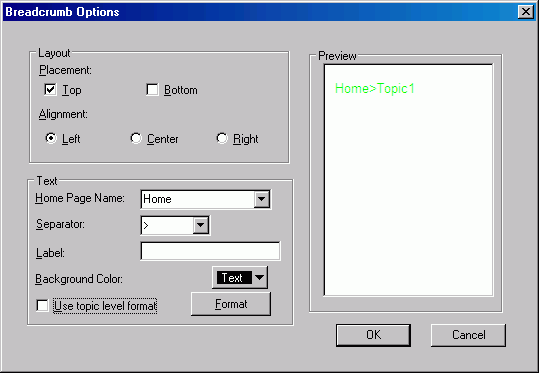
Please note that the direct formatting is set to green AND left aligned, neither of which is used in the output. Please also note that blue does not occur anywhere in my settings (css nor direct formatting).
Where does the blue come from?? And more importantly, how do I get rid of it?? I'd rather not fix something with master pages that wasn't broken in RH8 to begin with. And even if I'm forced to, I still want to know where the blue came from 🙂


 AdChoices