
abel001
Known Participant
March 18, 2019
Answered

CHM Help File hangs after closing the Properties window (robohelp 2015)

  • March 18, 2019
  • 1 reply
  • 1190 views

Hi,

I'm wondering if anyone has encountered this, or have a solution to fix this problem.

Steps:

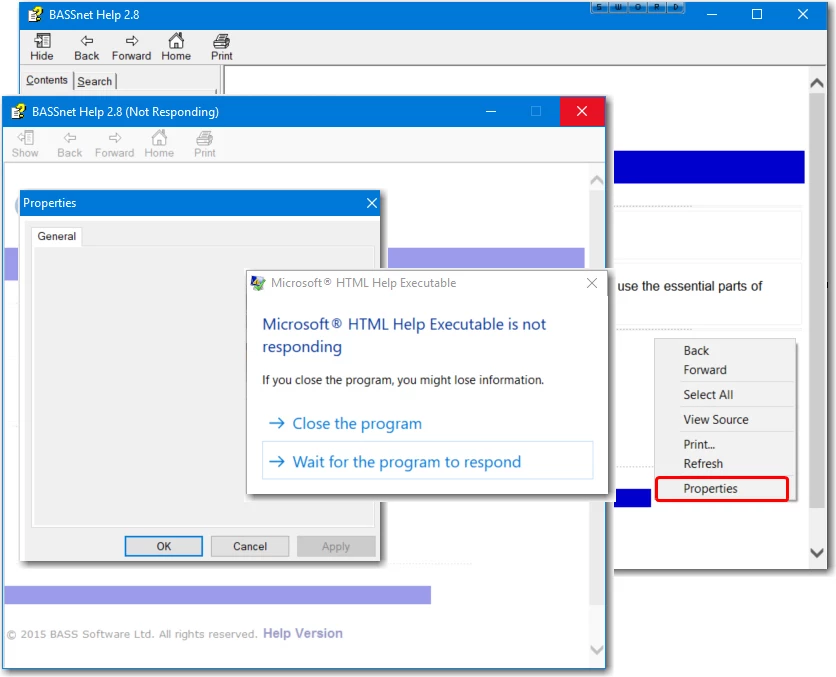
1. After generating the CHM help file, open it. Right click in any topic and select Properties.

2. The Properties window is displayed, but there is nothing inside except the "General" tab, which is empty.

3. Click OK or Cancel or X.

4. The whole Help File hangs (not responding).

I'm using Robohelp 2015.
This topic has been closed for replies.
Correct answer Peter Grainge

Hmm no issues with the sample projects. The problem must be unique to that particular project.


When you generate the CHM, are any problems reported in the Output View?

Does the CHM otherwise work OK? It's not right but I doubt any user would right click and select Properties.

The only other things I can think of are:-

  1. Create a new layout. (Don't use the duplicate layout option)
  2. Try it on another computer
  3. Experiment with changing the window properties
  4. Create a new window


See www.grainge.org for free RoboHelp and Authoring information.

@petergrainge

1 reply

Community Expert
March 18, 2019

Just checking you aren't generating to a network folder, or your MyDocuments folder or Desktop? Theoretically you shouldn't be able to see any content in that case, but thought I'd check, in case.

abel001
abel001Author
Known Participant
March 18, 2019

I'm generating it to the !SSL! folder inside the project folder, which is located on my desktop.

I'm fine with not seeing any content in the Properties window, but it causes the whole help file to hang.

Community Expert
March 18, 2019

Your desktop could be a network drive. It commonly is in large organisations.

Could you try copying the chm file to c:\temp and opening from there?