



Saravanan4594
Known Participant
May 10, 2021
Question

CHM Window placement issue in Robohelp 2020

  • May 10, 2021
  • 5 replies
  • 686 views

Hi Team,
We are using Robohelp 2020 Version 4 in our organization.
The Microsoft HTML Help output right side window is not fit correctly as the output generated from the earlier versions.
I have tried creating a new window but still, the issue persists and also i had tried reducing the height px and width px in Window settings > Window placement but it is not getting reflected in the output. Please find the below image I had pointed out the window misplaced as compared to the correct one left side.
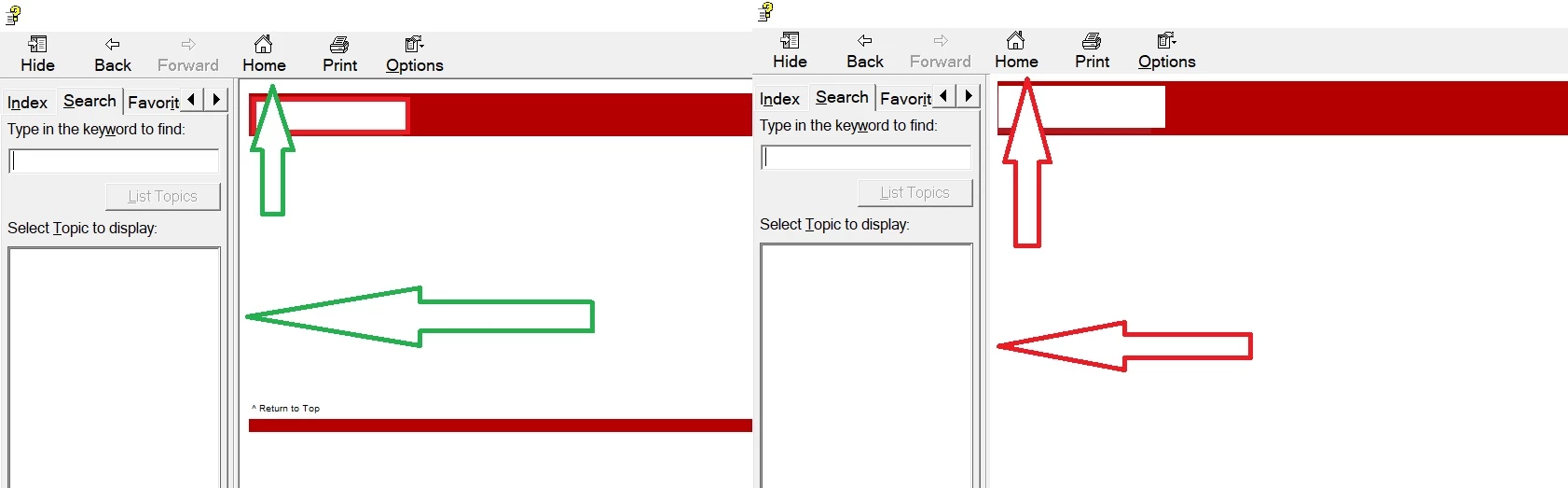
Could you please help me to resolve this issue?


Thanks and Regards,

Saravanan M

    This topic has been closed for replies.

    5 replies

    Community Expert
    September 17, 2021

    Have a look at the tracker link Peter posted above. You can see publically listed bug and feature requests there. I don't think it's all the issues Adobe is looking at, but it's better than nothing. You can also log your own bug and post the number here so people can vote on it.

    Jeff_Coatsworth
    Community Expert
    Community Expert
    September 2, 2021

    @FatimaN are you running Patch 5 in RH2020? @Saravanan4594 was on Patch 4 it seems...

    Inspiring
    September 2, 2021

    At present I am on patch 4, I will upgrade to patch 5 now. I am coming back to robohelp after a hiatus of two years. Somehow it is not as stable as it used to be.

    Saravanan4594
    Known Participant
    September 3, 2021

    I have tried generating the output even after updating to patch 5, still it remains the same.

    Peter Grainge
    Community Expert
    Community Expert
    May 10, 2021

    As far as I can see there is no setting that will bring this back in the new UI. If it is important to you your first port of call is Support and then maybe a bug report.


    See https://helpx.adobe.com/contact/enterprise-support.other.html#robohelp for your support contact options.


    Please follow this link to report bugs. https://tracker.adobe.com Post the link to your bug report in this thread and others can vote for it. The more people who do so, the higher it gets prioritised.

    ________________________________________________________
    See www.grainge.org for free Authoring and RoboHelp Information

    Use the menu (bottom right) to mark the Best Answer or Highlight particularly useful replies. Found the answer elsewhere? Share it here.
    Inspiring
    September 2, 2021

    @Saravanan4594 did you contact the support or report this issue? I am also facing the same issue.  It would be great if a solution can be found. 

    Saravanan4594
    Known Participant
    September 3, 2021

    Yes! Support could'nt help me. However, I have reported this issue but still no progress. 

    Peter Grainge
    Community Expert
    Community Expert
    May 10, 2021

    You mean the absence of a border? A screenshot with some text might make it clearer.

    ________________________________________________________
    See www.grainge.org for free Authoring and RoboHelp Information

    Use the menu (bottom right) to mark the Best Answer or Highlight particularly useful replies. Found the answer elsewhere? Share it here.
    Saravanan4594
    Known Participant
    May 10, 2021

    Yes! Exactly about the border I meant. 

    Peter Grainge
    Community Expert
    Community Expert
    May 10, 2021

    The left side of your image seems to be the same as the right side other than the colour of the arrow. I am not clear on what the problem is.

    ________________________________________________________
    See www.grainge.org for free Authoring and RoboHelp Information

    Use the menu (bottom right) to mark the Best Answer or Highlight particularly useful replies. Found the answer elsewhere? Share it here.
    Saravanan4594
    Known Participant
    May 10, 2021

    Now Could you find the edge difference between the two outputs?