
Sophie Delort
Participating Frequently
September 23, 2019
Question

Comment encadrer les rubriques ?

  • September 23, 2019
  • 5 replies
  • 629 views

Bonjour,

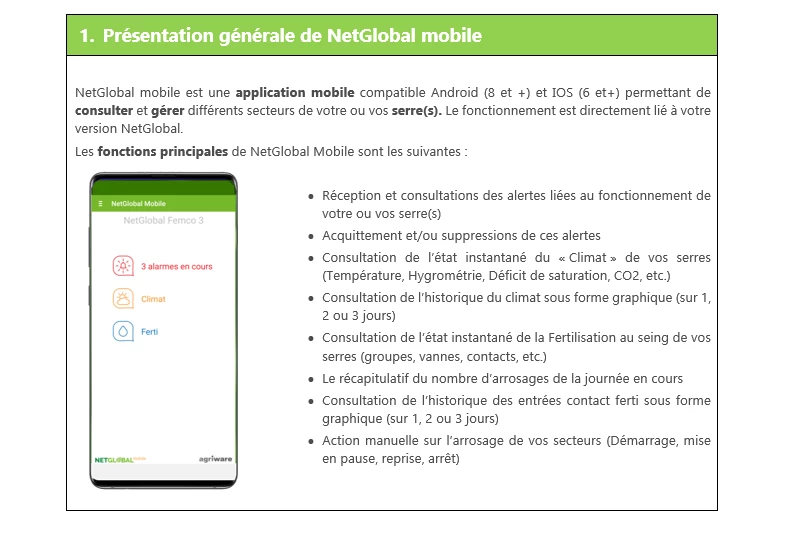
J'aimerais que toutes mes rubriques soient encadrées. Lorsque je choisis Bordure : le titre est encadré, puis l'image mais pas les deux ensemble. Comment faire, s'il vous plaît ? Merci de votre aide.

------------------------------------------------------------------------

Ci-dessous le résultat souhaité :
    This topic has been closed for replies.

    5 replies

    Peter Grainge
    Community Expert
    Community Expert
    October 4, 2019

    All I can say is that RoboHelp is able to produce all the output types that you have specified. How easily and how well when compared with other tools is something only you can decide.

    There's a lot of support on these forums which is also worth considering for those times when you get stuck on something.


    Use the menu (bottom right) to mark the Best Answer or Highlight particularly useful replies. Found the answer elsewhere? Share it here.
    Peter Grainge
    Community Expert
    Community Expert
    September 24, 2019

    Up to you but I have seen some very clever stuff done with RoboHelp. Perhaps if you cover the objective rather than just this issue, we can add some comment to help with the decision as to whether or not it will do what you want.


    Use the menu (bottom right) to mark the Best Answer or Highlight particularly useful replies. Found the answer elsewhere? Share it here.
    Sophie Delort
    Participating Frequently
    October 4, 2019

    I come back, after a few days completely lost in my working hypothesis.

    You're right, perhaps I have to consider the things on the whole, instead of churching the feasibility of details.


    I must write manual of instructions, a lot of product date sheets and a user guide for material, application and a software.

    All that documentation must be read on:

    • PC,

    • tablet,

    • smartphone

    • and print for classical use in binder.

    Each one must have a "nice" presentation: header with line, right stamp on the right page, likewise left, page number, body text 1 column, sometime 2 with table or technical draw, etc.


    I scrapped DITA, I don't have enough knowledge and time.

    So, I explore Robohelp, Calenco, MadcapFlare…. Other ? And what about the price ?


    Witch one is able to make what I want, with the time a have to do this (almost yesterday) ... That's the question... I think nobody can give me an answer: it's too unclear without seeing the expected result. In writing, too, and in english it's even more difficult.

    Community Expert
    September 23, 2019

    To be clear, it may be possible with other outputs, but I am not familiar with how to do it. I also can't look at it now, because it's very late here.


    Have a look at the outputs and skins. Play with the settings. If you have someone who knows CSS, they may be able to help as well. Post back with specific questions  when you get stuck.


    Sophie Delort
    Participating Frequently
    September 24, 2019
    A colleague developper had help me and think this software isn't enought powerfull to make what we need... So I think i'm going to close this subject and override... Anyway thanks a lot for your help, you made me gain time !
    Community Expert
    September 23, 2019

    Okay. I'll assume you're using the New version, not the Classic version. They are very different products, even though they share a similar name.


    What you can change and how you change it depends on the output and skin you choose.


    For example, I added these red borders in the Oceanic skin for Frameless output. I used the Learn a Latte sample project as an example.


    In the styles.css, I set the margin and padding to 0px and added a border for the h1 and body tags. Then I opened the Oceanic skin, clicked the Topic Page tab, expanded Center Panel and removed the padding from topic-box.


    But these options aren't available for the Responsive skins or PDF or Word output. I would need to do more research to figure out if these borders are possible.


    So have a look at the available skins and outputs. Play with the settings in the interface. Post again when you get stuck.

    Sophie Delort
    Participating Frequently
    September 23, 2019
    Okay, thank you. So I understand it's possible to get frames as shown in my little screenshot of my first message. I don't yet try those functions you say, but you reassure me, i can go ahead.
    Community Expert
    September 23, 2019
    I added some information to my post, which I'm not sure if you've seen. The forums are new and have a few bugs. 🙂
    Community Expert
    September 23, 2019

    I think we need some more information. Could you answer these questions to start?


    Which version of Robohelp? If 2019, are you using Classic or New?

    Which skin/screen layout are you using?

    Which output are you generating?

    Sophie Delort
    Participating Frequently
    September 23, 2019
    Thank you for your quick answer.
    Sophie Delort
    Participating Frequently
    September 23, 2019

    J'ai téléchargé la version d'évaluation pour savoir si le graphisme que je recherche est compatible avec les possibilités de Robohelp. Donc je pense avoir le dernier.


    Pour le moment je teste, j'essaie de comprendre, je remplie mes rubriques.
    Je n'ai pas encore choisi de sorties, mais je souhaite à la fin :

    • une sortie papier pdf
    • une sortie html pour mettre sur notre site internet afin que nos clients puissent consulter sur ordinateur, tablette et mobile nos documentations techniques.


    Nos documentations sont des notices de logiciel et d'application mobile.

    Je suis chargée de communication et graphiste ; je suis désolée si je ne suis pas toujours très claire, je découvre.


    Cordialement,