

Jared Hess
Legend
January 9, 2012
Question

Conditional Build Tags automatically appearing

  • January 9, 2012
  • 1 reply
  • 2492 views

I'm running RH 9.0.2.271 on Win 7, 64 bit machine.

I have this procedure in the WYSIWYG editor, and I want to mark the yellow icon (highlighted in yellow below) with the Online conditional build tag (green hash highlight):
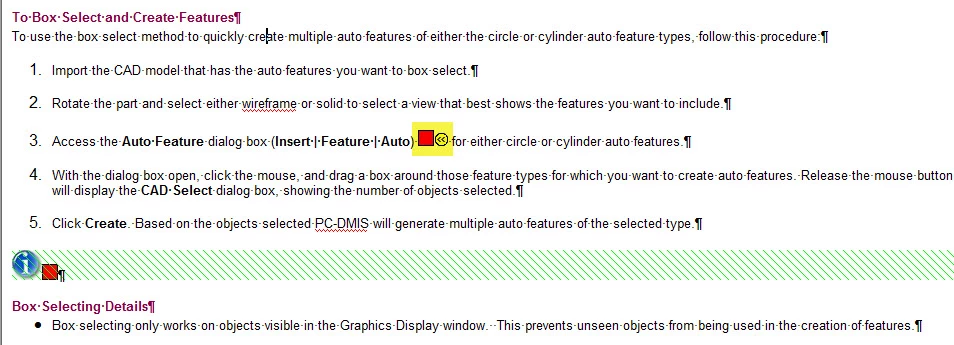
So, I select that CBT, and so far everything looks fine in the WYSIWYG editor.
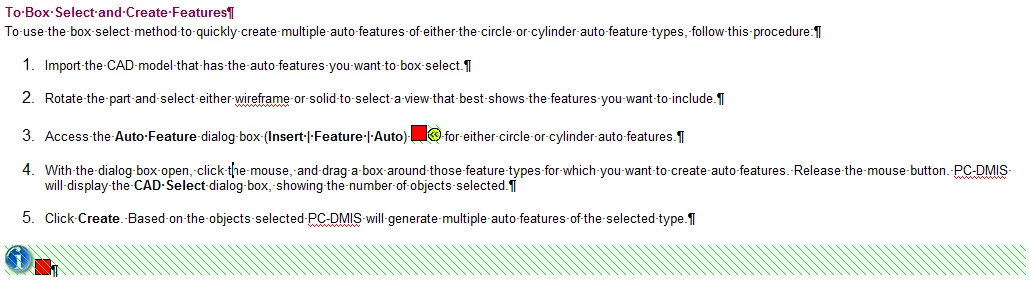
However, if I go to the HTML editor to check the HTML and then go back to the WYGIWYG editor, it's screwed up and looks like this:

Notice that the conditional online text is automatically covering steps 4 and 5 in the procedure. I thought this bug was supposedly exterminated in build 9.0.1, but seems to be happening... for me anyway. Any solutions to this? I've tried numerous ways of applying the CBT to that icon and it still ends up spanning the following two paragaphs.

This topic has been closed for replies.

1 reply

Jared Hess
Legend
January 9, 2012

Hmmm. Wait a second. I just fixed the topic up again (for the umpteenth time) and this last time instead of going to the HTML editor and back again, I decided to close down and reopen the topic in the WYSIWYG editor. Now if I go to HTML editor and back again the topic looks fine. So... go figure.

Anjaneai_Srivastava
Adobe Employee
Adobe Employee
January 9, 2012

Hello again ,

Thais one looks Strange.

I need to test this one out to understand this behavior.Though you have found a work around, but I would prefer to understand the reason (with your help).

I assume that you do not make any changes to any content or tag when you go to HTML view, Right?

Is this behaviour replicable one other topics of your project?

Can you share the HTML of this topic?

One important question, is this the same project generated by decompiling the CHM file ?

Thanks,

Anjaneai

Jared Hess
Legend
January 9, 2012

Anjaneai Srivastava wrote:

I assume that you do not make any changes to any content or tag when you go to HTML view, Right?

Correct. I just switched from one view and then back. But even when I made changes in the HTML editor, it came back in WYSIWYG. The HTML for the entire topic is quite long, but here's the bit in question, at least after the workaround:

<li class="p-BodyText"><p class="BodyText">Access the <b>Auto Feature</b>
dialog box (<b>Insert | Feature | Auto<span style="font-weight: normal;">)</span></b>
<script language="VBScript" style="x-condition: Online;" type="text/javascript">//<![CDATA[

On Error Resume Next

MenuStr = MapCtrl.GetHelpMap(26007) ' ID_INSERT_AUTO_CIRCLE

//]]></script><?rh-cbt_start condition="Online" ?><a

href="javascript://" onclick="MyRoadMap(MenuStr, 'no', event.screenX, event.screenY)"><?rh-cbt_start condition="Online" ?><img
src="../images/i_chiclet.gif" alt="Display Menu Roadmap" title="Display Menu Roadmap"
width="14" height="14" border="0" /><?rh-cbt_end ?></a><?rh-cbt_end ?><?rh-cbt_start condition="Online" ?>
<?rh-cbt_end ?>for either circle or cylinder auto features.</p></li>
<li class="p-BodyText"><p class="BodyText">With the dialog box open,
click the mouse, and drag a box around those feature types for which
you want to create auto features. Release the mouse button. PC-DMIS
will display the <span class="hcp4">CAD Select</span> dialog box,
showing the number of objects selected.</p></li>
<li class="p-BodyText"><p class="BodyText">Click <span class="hcp4">Create</span>.
Based on the objects selected PC-DMIS will generate multiple auto
features of the selected type.</p></li>

</ol>

<?rh-cbt_start condition="Online" ?><p class="BodyText"><a class="dropspot"

href="javascript:TextPopup(this)"
id="a21"><?rh-cbt_start condition="Online" ?><img
src="../i_blue.jpg" alt="See a brief demo on box selecting and creating multiple auto features"
title="See a brief demo on box selecting and creating multiple auto features"
style="border: none;" width="30" height="30" border="0" /><?rh-cbt_end ?></a><script
type="text/javascript" language="JavaScript1.2">//<![CDATA[

Anjaneai Srivastava wrote:

Is this behaviour replicable one other topics of your project?

I certainly hope not. It's a very large project (2700+ topics) so finding the issue again while likely is going to be a bit of a pain. However, I will be testing it soon. If I find anything, I'll let you know.

Anjaneai Srivastava wrote:

One important question, is this the same project generated by decompiling the CHM file ?

No. This is my original English project and was converted from RH 7.