


Known Participant
February 25, 2010
Answered

Conditional tags throw off spacing in HTML output

Hi, we use conditional tags to mark text to be hidden/shown when generated.

The marked text displays in html help as though there’s no space between the words “Customer” and “Definiton”:
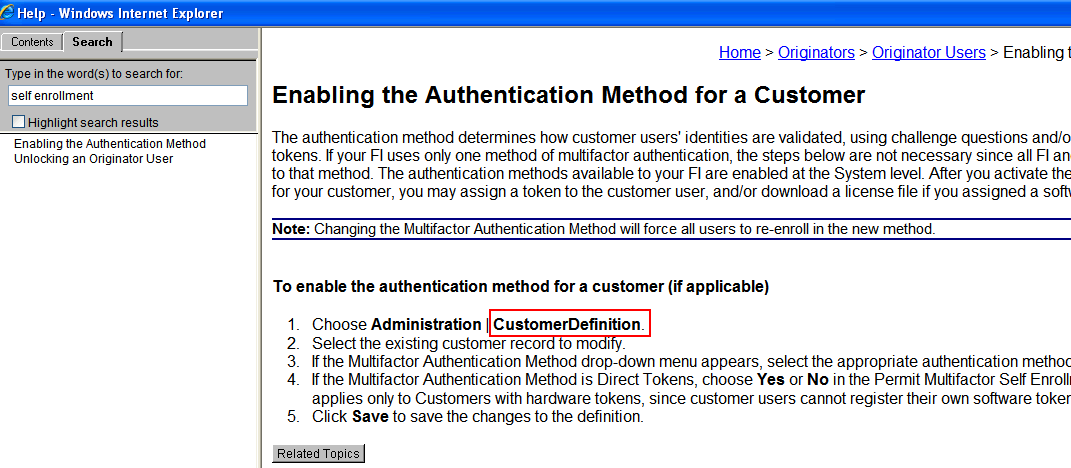
In the source file (below), I can see that there's a space that isn't tagged, but when we look at the output of this page, suddenly there's no space. Please see attached for images that show what we're dealing with.
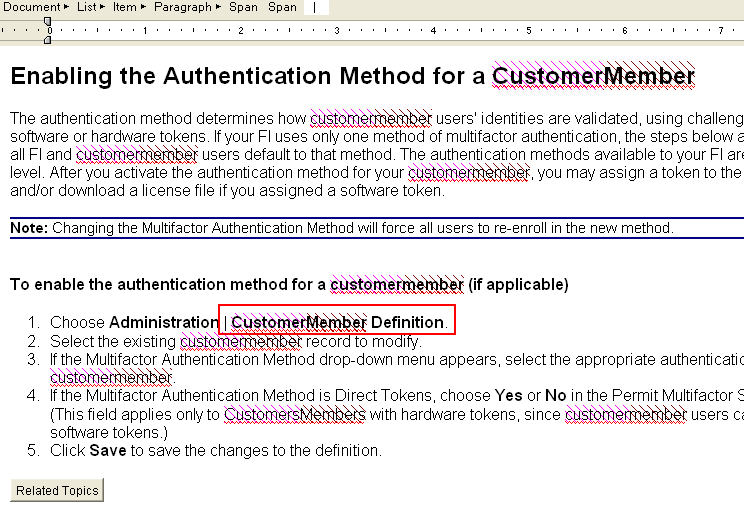
Any ideas as to what's going on here? I wondered if it had something to do with bolded words, since the other tags of the same or similar non-bolded words were displaying correctly.

Has anyone experienced this before?

This topic is closed to new replies. Start a new post to keep the conversation going.
Peter Grainge
Peter GraingeCorrect answer
Community Expert
February 27, 2010

Try replacing the space that is between the span tags with a non breaking space as shown at http://www.w3schools.com/HTML/html_entities.asp


See www.grainge.org for RoboHelp and Authoring tips

@petergrainge

Use the menu (bottom right) to mark the Best Answer or Highlight particularly useful replies. Found the answer elsewhere? Share it here.

9 replies

RoboColum_n_
Legend
February 26, 2010

Can you post the code from the HTML tab so we can see what is happening. I suspect you are right in that the different tags are getting confused but it is hard to say definitively without the underlying code.


  • Read the RoboColum(n) for a tips, tricks and musings on the Technical Communication Suite products.
  • Follow the RoboColum(n) on Twitter
Translate
Known Participant
February 26, 2010

Here is the section with the problem (sorry, image doesn't show up very large so I tried to resize it):

Please let me know if you need to see more. Thanks for looking at this, Colum.

Translate
Peter Grainge
Community Expert
Peter GraingeCommunity ExpertCorrect answer
Community Expert
February 27, 2010

Try replacing the space that is between the span tags with a non breaking space as shown at http://www.w3schools.com/HTML/html_entities.asp


See www.grainge.org for RoboHelp and Authoring tips

@petergrainge

Translate
Use the menu (bottom right) to mark the Best Answer or Highlight particularly useful replies. Found the answer elsewhere? Share it here.