

Jared Hess
Legend
December 8, 2016
Question

Conditionally show text and link to a merged chm

  • December 8, 2016
  • 1 reply
  • 361 views

RH Version: 2015 (build 12.0.3.428)

OS: Windows 10, x64

So, I know when you merge a chm into another chm, it adds a link in the Contents tab if that chm resides in the same folder.

For example, here we're merging an Inform.chm into our Inspect.chm help. Inform.chm is tied to a plugin type component in our application and isn't always installed on every users system.
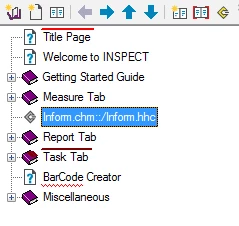
If the chms are in the same folder, like this:

Then in the chm, it adds in the tab:
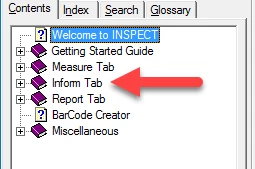
This is great, but Is there a way to do the same thing with text and links in an htm page? I want to conditionally add the text "Inform tab" between the "Measure tab" and "Report tab" text so to the user it appears seamlessly in the list of links: 
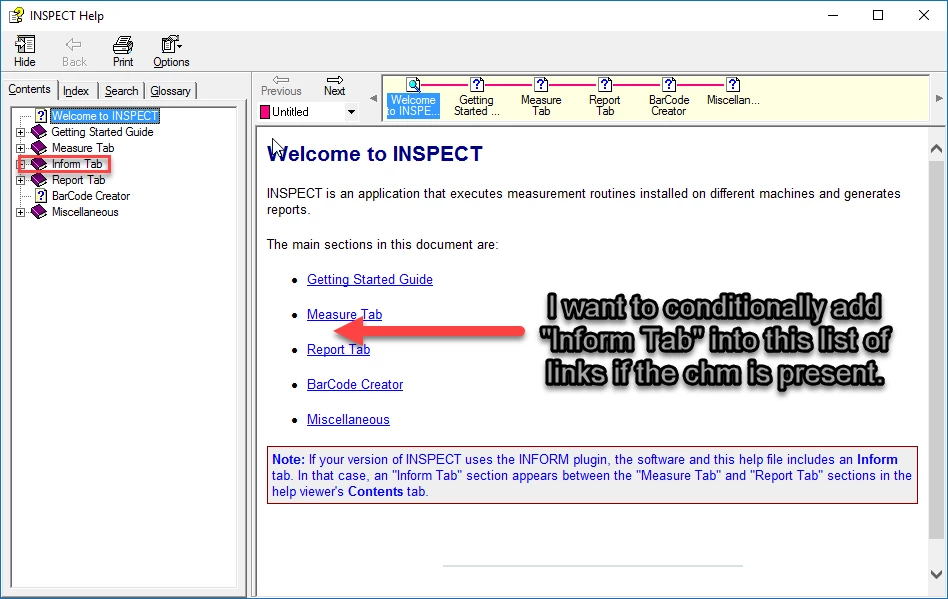
Has anyone done something like this? Like via scripting somehow?

This topic has been closed for replies.

1 reply

Captiv8r
Legend
December 8, 2016

Hmmm, maybe others will offer up a way, but in my own mind I'm thinking your best approach is to simply offer the link but follow it with the disclaimer that it will only work if the Inform Tab project is present.

Cheers... Rick

Inspiring
December 8, 2016

Is there a reason you cannot remove the "The main sections..." line, the links, and the note box? If you can, replace those with this text:

|

"Navigate through this help system using the Contents tab on the left side of each page."

|

The user can see the TOC; why do you have to repeat it?

Jared Hess
Legend
December 8, 2016

Thanks prhmusic2.
I suppose it's not strictly necessary. But users might want the space and have the tab hidden. But mainly, it's our modus operandi when creating new content, because we don't always know up front if we're going to have to generate printable content from it.