



Participant
November 12, 2020
Answered

Content of CHM file not visible on some computers (RH2019 Classic and Win10)

  • November 12, 2020
  • 2 replies
  • 516 views

I'm using RH2019 Classic to compile CHM help files (HTML Help) and some users are unable to see the content. They get a Windows message that the Publisher is unknown so I suspect that Windows is blocking the content but am not sure how to correct it. I previously used RH2015 and didn't experience this issue. Thanks.

    This topic has been closed for replies.
    Correct answer Peter Grainge

    What happens is they get this dialog.


    If they deselect the check box they will stop getting the warning. The reason they are getting it is, I believe, because they have downloaded the file from somewhere rather than it being installed as part of a program installation.


    I don't know why it is happening and did not in earlier versions. Was it delivered in a different way then?


    2 replies

    Peter Grainge
    Community Expert
    Peter GraingeCommunity ExpertCorrect answer
    Community Expert
    November 13, 2020

    What happens is they get this dialog.
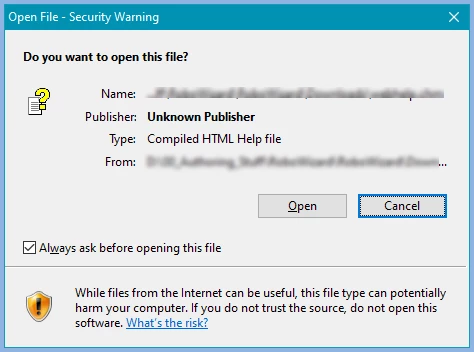


    If they deselect the check box they will stop getting the warning. The reason they are getting it is, I believe, because they have downloaded the file from somewhere rather than it being installed as part of a program installation.


    I don't know why it is happening and did not in earlier versions. Was it delivered in a different way then?


    Use the menu (bottom right) to mark the Best Answer or Highlight particularly useful replies. Found the answer elsewhere? Share it here.
    Earl16B8Author
    Participant
    November 13, 2020

    Thank you Amebr and Peter Grainge for replying to my query. We cleared the checkbox on the security warning and then we could see the content. I sincerely appreciate your help!

    Community Expert
    November 12, 2020

    What happens when they click Open?


    Also, please use the Insert Photo icon as many people won't download attachments for security reasons, and a forum bug means we need to close the topic and reopen it before we can reply.