
Known Participant
November 8, 2020
Question

Contents page Header issue

  • November 8, 2020
  • 1 reply
  • 249 views

Hi everyone,


I'm using the latest version of RH 2020.


This isn't a bug per say - but user error. I'm looking to see if there's a relatively easy fix.


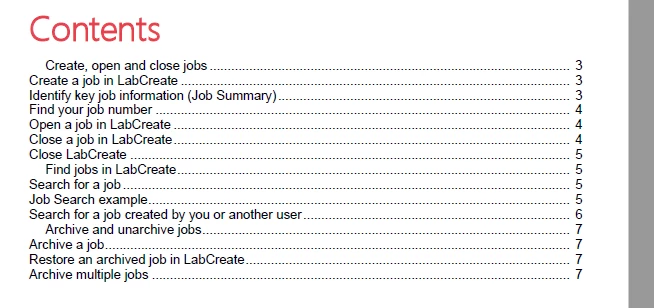
In short: My heading tags apear to be partly in the wrong order in the Contents page. It appears that the H1 and H2 tags etc in HTML seem be applied to the wrong  headers. Is there a way I can modify stylesheet to change this? 


See what I mean below. Create, open and close jobs should be 'normal - where as the headers below should indented - if that makes sense?
 

    This topic has been closed for replies.

    1 reply

    Peter Grainge
    Community Expert
    Community Expert
    November 10, 2020

    Is this Word or PDF?


    In Word you can map the headings in RoboHelp to the styles in a template. Maybe you have that set up incorrectly or the Word styles are set up incorrectly?


    Otherwise the headings control the indentation.


    Have you checked the code in the source to see the headings are correct?


    Use the menu (bottom right) to mark the Best Answer or Highlight particularly useful replies. Found the answer elsewhere? Share it here.