


Context ID window - want the window heading to show the topic title instead of project name
We upgraded from RH 2017 to RH 2020. We use Context IDs and generate a responsive HTML5 output.
The QA department uses an automation script to test that the context IDs work when users press F1 to display the topic for the view or dialog box currently being viewed in the UI.
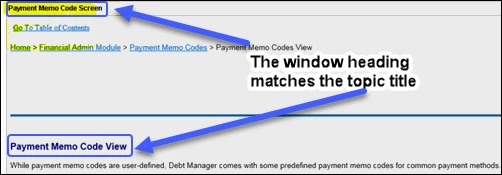
In the RH2017 generation, the F1 window showed the topic title in the window heading. The following image shows a topic from a RH2017 generation that was displayed by pressing F1.
The following images shows a topic displayed by pressing F1 from a RH2020 generation. You can see that the window heading shows the project name not the topic title.
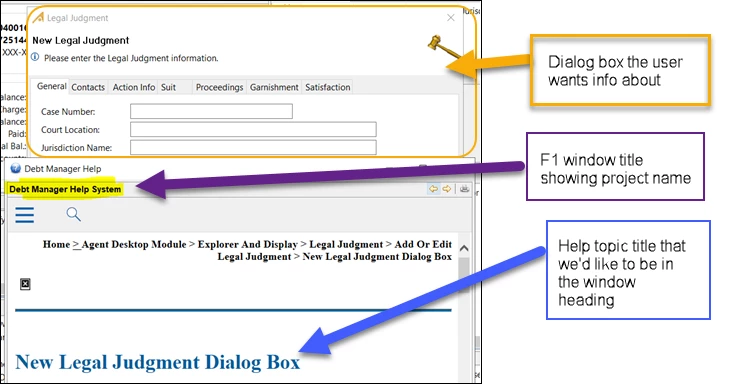
The QA automation testing script uses the text in the window header to confirm that the correct topic is being displayed for the specific context ID. Now because the 2020 generation shows the project name in all the F1 window headers instead of the topic titles, the QA automation script fails and doesn't recognize that the correct topics are being called by the context IDs.
Before we tell the QA automation team that they have to rewrite the context ID testing script, does anyone know of a way to set up the generation process in RH2020 to show the topic title in the window heading when users hit F1 to display a topic by the context ID?
Thanks
 AdChoices