Participating Frequently
May 7, 2021
Answered

Controlling output when printing from Mini-TOC

  • May 7, 2021
  • 5 replies
  • 473 views

Using RH 2020, Update 4. The output is Frameless, using the Oceanic skin.

Is there a way to control the print functionality in the Mini-TOC? I would like to either have the printed file to contain the header and footer from the Master Page on each page, or have the Print icon open a designated PDF file. If I'm unable to do either, is there a way to disable the Print icon in the Mini-TOC? 



    This topic has been closed for replies.
    Correct answer Peter Grainge

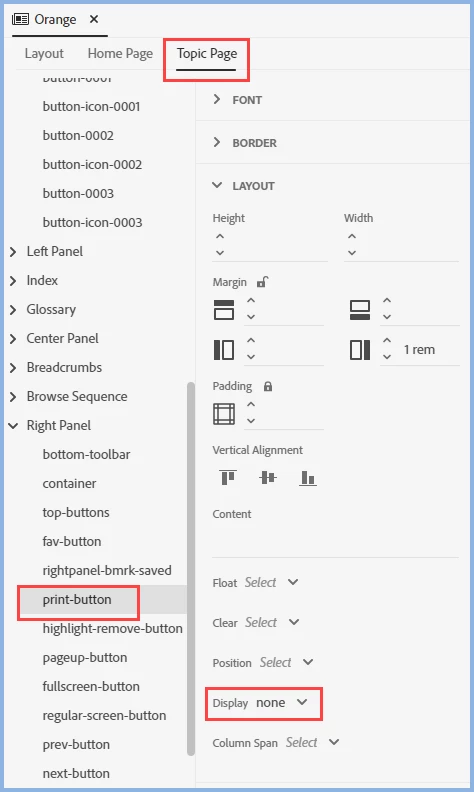
    With that prompt from @Stefan Gentz I found the easier way in the skin editor.


    ________________________________________________________
    See www.grainge.org for free Authoring and RoboHelp Information

    5 replies

    Community Expert
    May 10, 2021

    Is the problem that you have background shading on the footer and that doesn't print? If so I think that's a browser print setting that users have to change manually. This is partly an historical feature, from when colour printing was much more expensive, and also noisy background images were popular.  (hello MySpace 🙂   )

    Peter Grainge
    Community Expert
    Peter GraingeCommunity ExpertCorrect answer
    Community Expert
    May 7, 2021

    With that prompt from @Stefan Gentz I found the easier way in the skin editor.


    ________________________________________________________
    See www.grainge.org for free Authoring and RoboHelp Information

    Use the menu (bottom right) to mark the Best Answer or Highlight particularly useful replies. Found the answer elsewhere? Share it here.
    Participating Frequently
    May 7, 2021

    Thank you so much - Peter's suggestion worked. I'm glad that the solution was within the skin, and not a post-generation fix. 

    Jeff_Coatsworth
    Community Expert
    Community Expert
    May 7, 2021

    Another tidbit for your site @Peter Grainge ?

    Community Manager
    May 7, 2021

    If you want to hide the print button above the MiniTOC, you can do it by adding the following to the layoutdiff.css:

    .RH-LAYOUT-RIGHTPANEL-print-button {
       display: none;
    }


    Peter Grainge
    Community Expert
    Community Expert
    May 7, 2021

    The nearest I could find was deleting the icon in skin editor but it leaves a gap and the functionality is still there.


    I can't see any way of editing how it works so your options as far as I can see are:-


    See https://helpx.adobe.com/contact/enterprise-support.other.html#robohelp for your support contact options.


    Please follow this link to request features. https://tracker.adobe.com. Post the link to your feature request in this thread and others can vote for it. The more people who do so, the higher it gets prioritised.

    ________________________________________________________
    See www.grainge.org for free Authoring and RoboHelp Information

    Use the menu (bottom right) to mark the Best Answer or Highlight particularly useful replies. Found the answer elsewhere? Share it here.