
Inspiring
November 4, 2020
Answered

Convert pages to books? (RH 2019, new UI)

  • November 4, 2020
  • 2 replies
  • 297 views

Hi, Everyone.


I've imported a MS Word doc into RH 2019 (new UI). The import created topics that are all "pages," as opposed to "books" (screenshot):
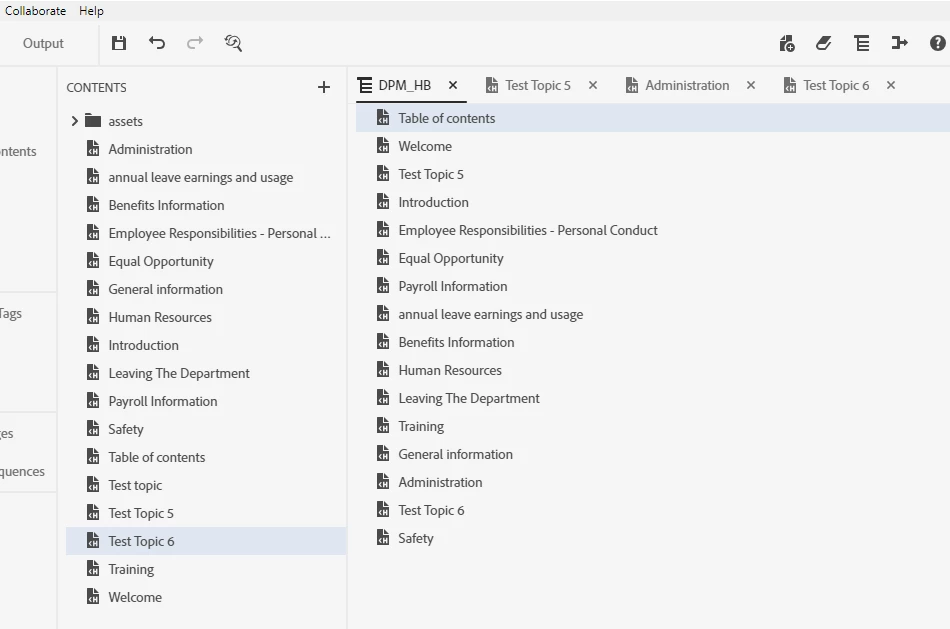


 Now that I'm creating a Table of Contents for the project, I'm wanting to nest some topics under others. But apparently b/c they're all "pages" (not books), the "Move Item Right" button doesn't have any effect.


Is there a way to convert a page into a book?  If not, how should I proceed?


Thanks!!

    This topic has been closed for replies.
    Correct answer Amebr

    Create a book and then drag the required pages into the book is the only way to do it in RH2019. I think that might have changed in RH2020, but I'm not sure.

    2 replies

    Inspiring
    November 11, 2020

    Oh, makes perfect sense.


    Thanks, Amber!!

    AmebrCommunity ExpertCorrect answer
    Community Expert
    November 4, 2020

    Create a book and then drag the required pages into the book is the only way to do it in RH2019. I think that might have changed in RH2020, but I'm not sure.