
Participating Frequently
March 24, 2014
Answered

Corrupt Czech characters in Table of Contents

  • March 24, 2014
  • 1 reply
  • 655 views

Hi everyone.

I am working on a pretty big help project in Czech. This is not something I started from scratch, I took it over from a colleague who left our company recently, so I don't know much about how it was done.

The project is made of 3 components, resulting in 3 CHMs which are then copied in the same folder with another CHM using some sort of algorithm.

Once all these files (4 CHMs in total) are copied in a software's Help folder, they are displayed as a single component when you clic the Help button in the software - meaning you see a complete TOC with chapters from all 3 files).

The problem is, when I compile the individual CHMs, I get the message "HTML help settings has unsupported characters for the chosen language. Do you want to continue?"

If I continue, the file is compiled and when I open it, the TOC looks ok. However, when I copy it with the other files and open it in the software (a CAD type program) some characters are replaced with someting else:
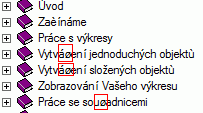

I am using Robo Help 10 and the font in the files is Verdana. I read on another thread that the font might be the problem, but I don't know how to change it in all the files (except perhaps from Internet Options in the chm directly?)

My regional settings are also set to Czech when I compile the file, so there shouldn't be a problem. However, every time I compile, I get that message and corrupt characters are displayed in the software's Help.

Can anyone help with this?

Thanks in advance.


Christina



This topic has been closed for replies.
Correct answer Jared Hess

I'm using RH 9.

From my experience figuring out character issues like this can sometimes more of an art than a science. That's what it seems like anyway.

Some issues at play can be:

  1. Desktop language for non-unicode programs should match the output - From Control Panel, in the Region and Language dialog box, on the Administrative tab, make sure the language for non-unicode programs is set to the target language.
  2. RoboHelp language settings - Under File | Project Settings, ensure you've set the Language in RH to Czech for all the projects. In addition, in the Single Source Layouts pod, right-click on the output and choose Properties and in the Language drop down, make sure it's set to Czech.
  3. Character encoding in the file itself - Open the file (in this case .hhc) inside of a text editor like Notepad++ and from the Encoding menu, check its character encoding. From experience, this should be set to Encode in UTF-8 or Encode in UTF-8 without BOM.
  4. Character encoding in the XML tag - Also in Notepad++, check the encoding in the first <?xml ...> tag in line 1. From my hhc file we translated into Czech, it's set to <xml version="1.0" encoding="utf-8"?>

1 reply

Jared Hess
Jared HessCorrect answer
Legend
March 24, 2014

I'm using RH 9.

From my experience figuring out character issues like this can sometimes more of an art than a science. That's what it seems like anyway.

Some issues at play can be:

  1. Desktop language for non-unicode programs should match the output - From Control Panel, in the Region and Language dialog box, on the Administrative tab, make sure the language for non-unicode programs is set to the target language.
  2. RoboHelp language settings - Under File | Project Settings, ensure you've set the Language in RH to Czech for all the projects. In addition, in the Single Source Layouts pod, right-click on the output and choose Properties and in the Language drop down, make sure it's set to Czech.
  3. Character encoding in the file itself - Open the file (in this case .hhc) inside of a text editor like Notepad++ and from the Encoding menu, check its character encoding. From experience, this should be set to Encode in UTF-8 or Encode in UTF-8 without BOM.
  4. Character encoding in the XML tag - Also in Notepad++, check the encoding in the first <?xml ...> tag in line 1. From my hhc file we translated into Czech, it's set to <xml version="1.0" encoding="utf-8"?>
Participating Frequently
March 25, 2014

Thanks a lot Jared!

Apparently, the master file with links was the problem, it was the only one which did not have the language set to CZ (point 2 in your solution).

Now it is solved

Jared Hess
Legend
March 25, 2014

Great! Glad I could help.