

aartk14862008
Participating Frequently
May 24, 2016
Question

cpd

  • May 24, 2016
  • 1 reply
  • 576 views

After a system recovery I re-installed Robohelp 11 on my Desktop.

I have a problem with opening old projects. When opening from the normal folder on my D:\Aart Korstjens\Mijn Documenten\My RoboHelp Projects\Adobe RoboHelp 2015 I see this message. .
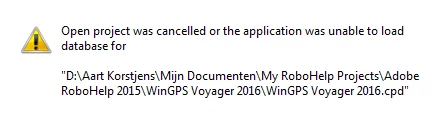
When I copy this folder to my desktop and I try to open the same project from there is no problem!

Also a problem with new projest. When I try to create a new folder I see this message.

What went wrong with the re-install?

Greetings from the Netherlands

Aart

    This topic has been closed for replies.

    1 reply

    Captiv8r
    Legend
    May 24, 2016

    See if the video linked below helps you solve it.

    RoboWizard

    Cheers... Rick

    aartk14862008
    Participating Frequently
    May 24, 2016

    Hi Rick,

    I followed the instructions on the video but still it does not work.

    I got a new pop up and "upgraded" but the project was already made in RH2015.

    After that I got the same pop up as before.

    I also tried to delete the .cpd file but that also does not help.

    Aart

    from the Netherlands

    Peter Grainge
    Community Expert
    Community Expert
    May 26, 2016

    At the beginning of this thread you are talking about Rh11 being reinstalled but now you are talking about RoboHelp 2015. Which was the last version installed. If it is RoboHelp 11, I would try reinstalling RoboHelp 2015.

    Next I would move the project to C:\ProjectName to see if that helps. MyProjects is usually installed to the same drive as the User Profile and Programs.


    See www.grainge.org for RoboHelp and Authoring information

    @petergrainge

    Use the menu (bottom right) to mark the Best Answer or Highlight particularly useful replies. Found the answer elsewhere? Share it here.