


Participant
December 5, 2025
Question

Cross Reference Converter RH 2022 Script

  • December 5, 2025
  • 2 replies
  • 172 views

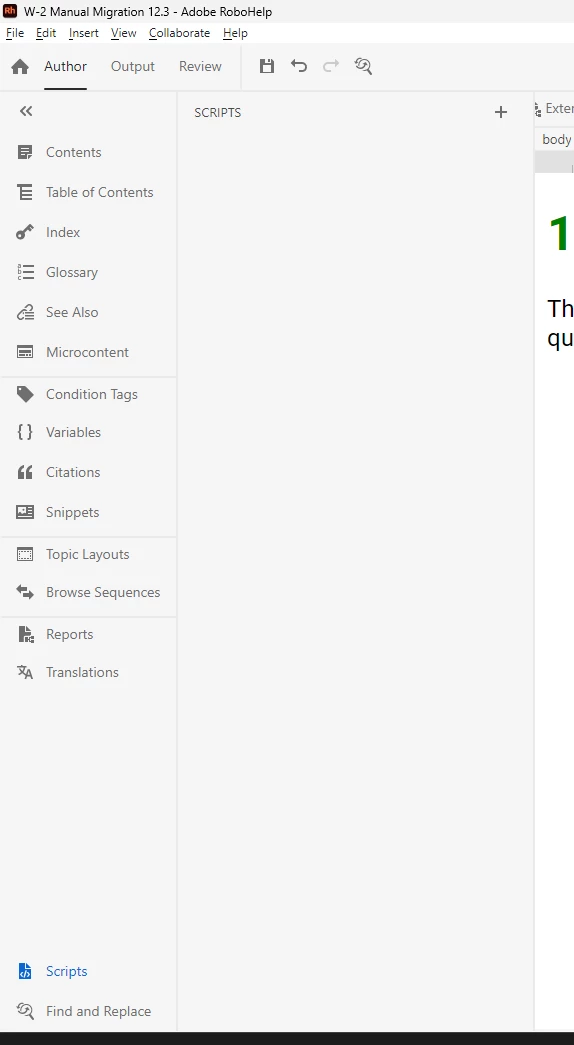
Hi, I upgraded a classic RH 2015 project to the new UI RH (Version 2022.4.179) and would like to use the Adobe included script for converting topic hyperlinks to cross references. problem i'm running into is that i cannot seem to locate the script. Shouldn't the included scripts be located here? What am I missing?Screenshot of scripts panel.png
2 replies

Jeff_Coatsworth
Community Expert
Community Expert
December 8, 2025

@abigail_7386  How did you make out? Did they appear if you installed as an admin?

Participant
January 2, 2026

Sorry, no luck yet. Still waiting on my IT department. 

Peter Grainge
Community Expert
Community Expert
December 5, 2025

If I click on Scripts, I see this.


image.png


Is RoboHelp installed on your C drive in the default location?


Was it installed with admin rights?

________________________________________________________

My site www.grainge.org includes many free Authoring and RoboHelp resources that may be of help.


Use the menu (bottom right) to mark the Best Answer or Highlight particularly useful replies. Found the answer elsewhere? Share it here.
Participant
January 6, 2026

Robohelp is installed in the default location on my C drive. But not installed with admin rights. Is there a reason installing without admin rights could impact my ability to access default scripts? Asking becuase without justification, i doubt our IT department will want allow it.  Alternatively, is there anyway to access the default script texts elsewhere, so i could copy-paste them as a new script in RH? 


Thanks!

Peter Grainge
Community Expert
Community Expert
January 6, 2026

The operative word is "installed" with admin rights. The theory is that during installation admin rights are required and then it can be run without admin rights. Thus IT can oversee that.


That said, I think there have been times when using RoboHelp without admin rights has presented some users with issues. That could be because IT have tightened something else.


First things first though, get IT to give you admin rights and oversee you installing RoboHelp. They can then remove those rights and let you see how things go.

________________________________________________________

My site www.grainge.org includes many free Authoring and RoboHelp resources that may be of help.


Use the menu (bottom right) to mark the Best Answer or Highlight particularly useful replies. Found the answer elsewhere? Share it here.