Inspiring
September 28, 2026
Answered

CrossReferenceConverter script in H 2022

Is the CrossReferenceConverter script broken in RH 2022? I keep getting the message ‘ createMuiTheme is not a function’ when I try to run the script.

    Peter Grainge
    Peter GraingeCorrect answer
    Community Expert
    October 1, 2026

    Adobe have kindly supplied a fix.

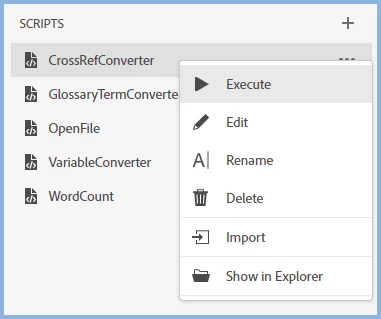
    In your project(s) open the script pod, right click CrossRefConverter and click Show In Explorer.


    Paste the following above the existing first line (without the asterisks)

    ****************************************

    ;(function ensureMaterialUI() {

     if (window.MaterialUI && typeof window.MaterialUI.createMuiTheme === 'function') {

       return

     }

     const libraries = [

       'https://unpkg.com/react@17.0.2/umd/react.development.js',

       'https://unpkg.com/react-dom@17.0.2/umd/react-dom.development.js',

       'https://unpkg.com/@material-ui/core@4.12.4/umd/material-ui.development.js'

     ]

     libraries.forEach(src => {

       const request = new XMLHttpRequest()

       request.open('GET', src, false)

       request.send()

       if (request.status !== 200) {

         throw new Error('Unable to load ' + src + ' (HTTP ' + request.status + ')')

       }

       new Function('exports', 'module', 'define', request.responseText).call(window)

     })

    })()

    ****************************************

    The script will then run correctly in that project.

    You should also fix the script in C:\Program Files\Adobe\Adobe RoboHelp\resources\data\scripting for any new projects.


    My site www.grainge.org includes many free Authoring and RoboHelp resources that may be of help.


    Use the menu (bottom right) to mark the Best Answer or Highlight particularly useful replies. Found the answer elsewhere? Share it here.


    8 replies

    Inspiring
    October 2, 2026

    Peter, you are right that the title of the script is ‘Convert Hyperlinks to Cross-references’, but you don’t see that until you execute the script (which has been broken until now). Until that fix all that you could see in the Scripts pod is the script name: ‘CrossReferenceConverter’. On its own that is clearly ambiguous.(Is it converting to, or from, cross references?)
    I am surprised that that you are surprised that I should think that broken cross-references could  possibly be fixed. Well, the import from Word clearly imports the cross-references: they appear in your HTML as bookmarks. Is it too much to have hoped that the code-savvy Adobe programmers could determine what topic they came from and re-instate the cross-reference – if only as a post-import script?

    Translate
    Peter Grainge
    Community Expert
    Community Expert
    October 2, 2026

    I think we’ll have to agree to differ. It is designed to convert a working hyperlink to a working cross reference. You say you have broken cross references so that’s a different starting point.


    My site www.grainge.org includes many free Authoring and RoboHelp resources that may be of help.

    Translate
    Use the menu (bottom right) to mark the Best Answer or Highlight particularly useful replies. Found the answer elsewhere? Share it here.

    Peter Grainge
    Community Expert
    Peter GraingeCommunity ExpertCorrect answer
    Community Expert
    October 1, 2026

    Adobe have kindly supplied a fix.

    In your project(s) open the script pod, right click CrossRefConverter and click Show In Explorer.


    Paste the following above the existing first line (without the asterisks)

    ****************************************

    ;(function ensureMaterialUI() {

     if (window.MaterialUI && typeof window.MaterialUI.createMuiTheme === 'function') {

       return

     }

     const libraries = [

       'https://unpkg.com/react@17.0.2/umd/react.development.js',

       'https://unpkg.com/react-dom@17.0.2/umd/react-dom.development.js',

       'https://unpkg.com/@material-ui/core@4.12.4/umd/material-ui.development.js'

     ]

     libraries.forEach(src => {

       const request = new XMLHttpRequest()

       request.open('GET', src, false)

       request.send()

       if (request.status !== 200) {

         throw new Error('Unable to load ' + src + ' (HTTP ' + request.status + ')')

       }

       new Function('exports', 'module', 'define', request.responseText).call(window)

     })

    })()

    ****************************************

    The script will then run correctly in that project.

    You should also fix the script in C:\Program Files\Adobe\Adobe RoboHelp\resources\data\scripting for any new projects.


    My site www.grainge.org includes many free Authoring and RoboHelp resources that may be of help.


    Translate
    Use the menu (bottom right) to mark the Best Answer or Highlight particularly useful replies. Found the answer elsewhere? Share it here.

    Inspiring
    October 2, 2026

    Thanks Peter. That now brings up the Convert Hyperlinks to Cross-reference dialogue, but the dialog is empty of references. I sense, now, that it’s not meant to do what I was hoping it would do. I was hoping it would reconstruct cross-references in my RH topics after they were stripped out during a Word import. (The name is what misled me: its seems it should really be HyperlinkConverter,)

    Translate
    Peter Grainge
    Community Expert
    Community Expert
    October 2, 2026

    The title is Convert Hyperlinks to Cross-reference and that is what it does. It takes Hyperlinks and makes them Cross References. What you seem to be describing is cross references in Word that were stripped out. I am not following how you expect broken cross references to be fixed. The script is looking for hyperlinks.

    Before posting the solution I did test that it does do just that.

    Am I misunderstanding something?


    My site www.grainge.org includes many free Authoring and RoboHelp resources that may be of help.

    Translate
    Use the menu (bottom right) to mark the Best Answer or Highlight particularly useful replies. Found the answer elsewhere? Share it here.
    Peter Grainge
    Community Expert
    Community Expert
    September 28, 2026

    Looks like a bug, I am seeing it too in a simple test.


    Please follow this link to report bugs or request new features. https://tracker.adobe.com. Post the link to your bug report / feature request in this thread and others can vote for it. The more people who do so, the higher it gets prioritised.


    My site www.grainge.org includes many free Authoring and RoboHelp resources that may be of help.

    Translate
    Use the menu (bottom right) to mark the Best Answer or Highlight particularly useful replies. Found the answer elsewhere? Share it here.
    Inspiring
    September 29, 2026

    Thanks Peter. Will do. Cheers.

    Translate
    Peter Grainge
    Community Expert
    Community Expert
    September 29, 2026

    Hold tight. I referred this to a contact and they are looking at whether there is capacity to fix this sooner rather than later.


    My site www.grainge.org includes many free Authoring and RoboHelp resources that may be of help.

    Translate
    Use the menu (bottom right) to mark the Best Answer or Highlight particularly useful replies. Found the answer elsewhere? Share it here.