
Sleant
Inspiring
October 17, 2019
Answered

CSH Flickers Through the Content for 2 Seconds

  • October 17, 2019
  • 4 replies
  • 522 views

My issue is: every time when CSH is called, it “flickers through the landing page (where all the tiles are), then flickers about 2 more times, and then it finds the topic” in approximately 2 seconds. It looks like it has to go through the hierarchy of the online help system to find the topic. My Developer is using .java provided by Adobe and the call is this http://localhost/index.htm?rhcsh=1&rhmapno=1

Do you know if we need to add anything to the call to stop the “going through the hierarchy” to find the topic? Thank you so so much.

I also replied to this post https://community.adobe.com/t5/RoboHelp/Indigo-flickering-via-CSH/m-p/10674749#M126873
This topic has been closed for replies.
Correct answer Sleant

Couldn't find any "true" resolution, so I reached out to our go-to person for coding. Found this solution to work. Hope someone finds it useful.


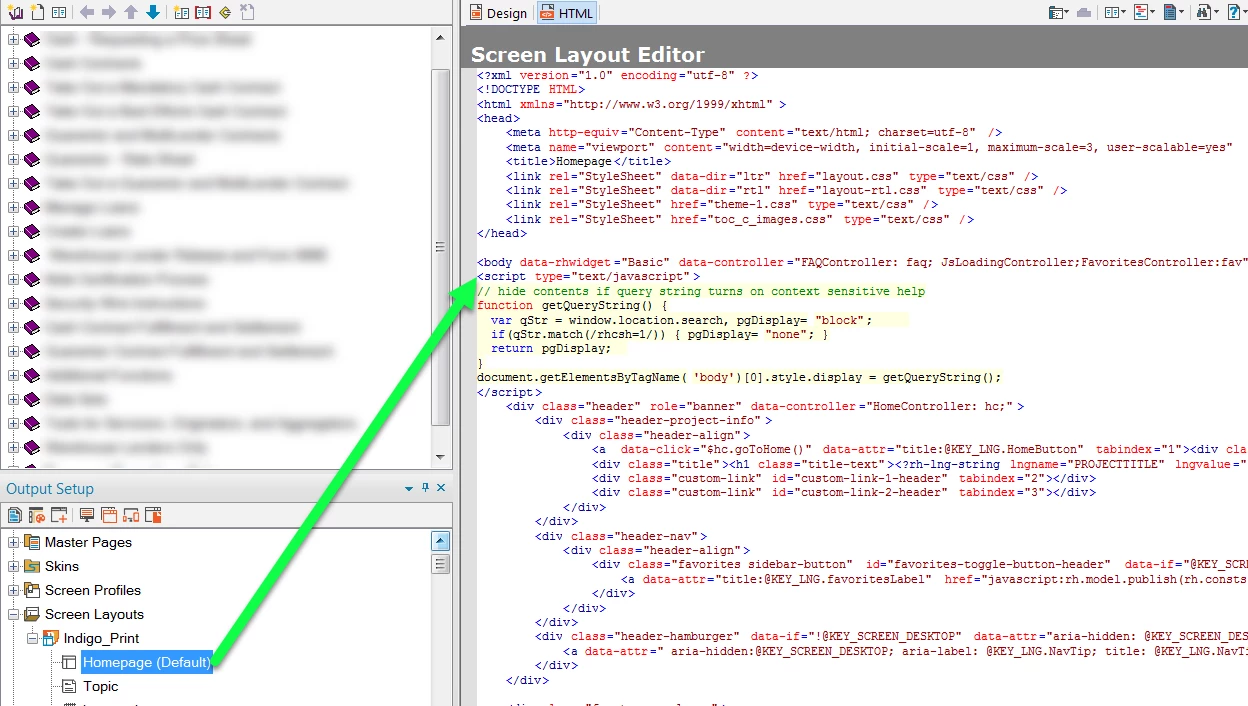
Insert this code after the body tag in the "Homepage (Default)" properties of the Indigo layout:

<script type="text/javascript">
// hide contents if query string turns on context sensitive help
function getQueryString() {
var qStr = window.location.search, pgDisplay="block";
if(qStr.match(/rhcsh=1/)) { pgDisplay="none"; }
return pgDisplay;
}
document.getElementsByTagName('body')[0].style.display = getQueryString();
</script>


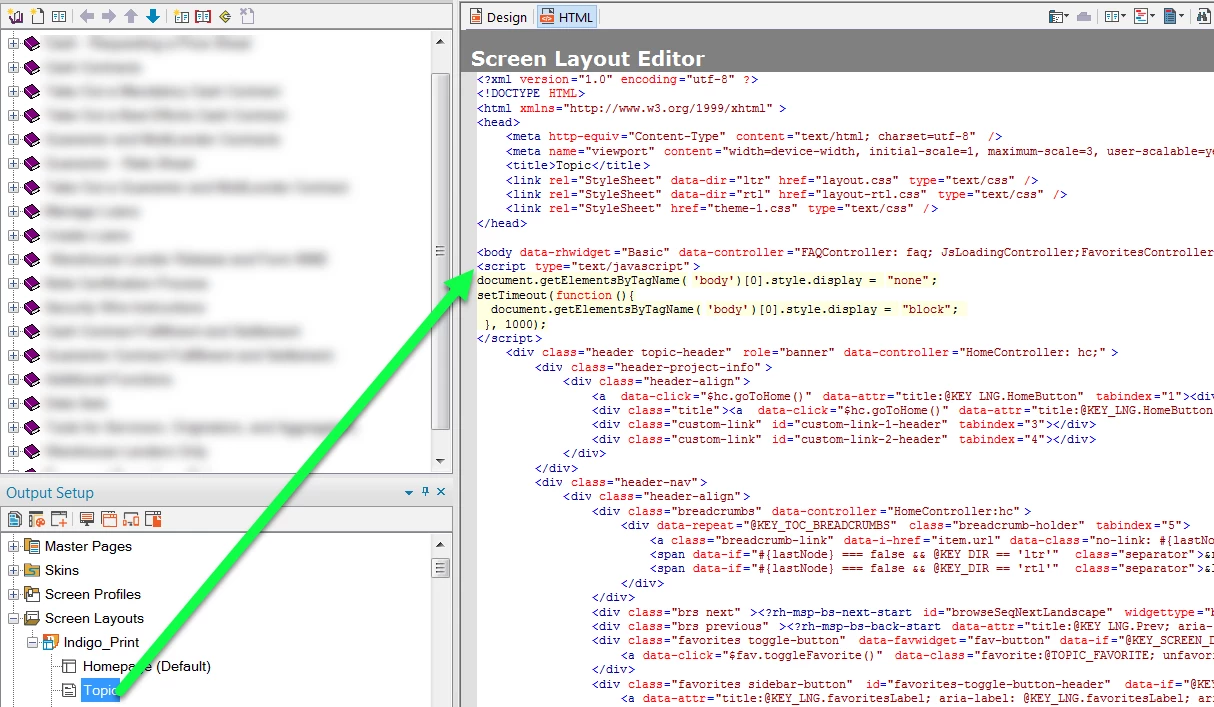
Insert this code after the body tag in the "Topic" properties of the Indigo layout:

<script type="text/javascript">
document.getElementsByTagName('body')[0].style.display = "none";
setTimeout(function(){
document.getElementsByTagName('body')[0].style.display = "block";
}, 1000);
</script>

4 replies

Sleant
SleantAuthor
Inspiring
October 25, 2019

I also wanted to thank  Willam Weelden for emailing me back and providing the URL instead of CSH solution (basically use URL instead of CSH)... he was very helpful as always. Unfortunately, I believe he's retired from RH.

Sleant
SleantAuthorCorrect answer
Inspiring
October 25, 2019

Couldn't find any "true" resolution, so I reached out to our go-to person for coding. Found this solution to work. Hope someone finds it useful.


Insert this code after the body tag in the "Homepage (Default)" properties of the Indigo layout:

<script type="text/javascript">
// hide contents if query string turns on context sensitive help
function getQueryString() {
var qStr = window.location.search, pgDisplay="block";
if(qStr.match(/rhcsh=1/)) { pgDisplay="none"; }
return pgDisplay;
}
document.getElementsByTagName('body')[0].style.display = getQueryString();
</script>


Insert this code after the body tag in the "Topic" properties of the Indigo layout:

<script type="text/javascript">
document.getElementsByTagName('body')[0].style.display = "none";
setTimeout(function(){
document.getElementsByTagName('body')[0].style.display = "block";
}, 1000);
</script>

Sleant
SleantAuthor
Inspiring
October 17, 2019
We are using RoboHelp 2017 with all the updates. We're publishing as Responsive HTML5 using the Indigo layout.
Jeff_Coatsworth
Community Expert
Community Expert
October 17, 2019

Ok, basic stuff - what version of RH? Is it all up to date? If it's RH2019, are you doing this through the Classic version or the new UI version? What type of help are you creating and what skin/layout is being used?