
CSS not displaying properly
My CSS file includes the following formatting for a "Note":
p.Note {
border-left-style: Solid;
border-right-style: Solid;
border-top-style: Solid;
border-bottom-style: Solid;
background-color: #fafade;
padding-left: 12px;
padding-right: 12px;
padding-top: 6px;
padding-bottom: 6px;
font-size: 9pt;
line-height: 12pt;
border-left-width: 1px;
border-right-width: 1px;
border-top-width: 1px;
border-bottom-width: 1px;
border-left-color: #a3a5a7;
border-right-color: #a3a5a7;
border-top-color: #a3a5a7;
border-bottom-color: #a3a5a7;
margin-top: 12px;
x-next-class: ;
x-next-type: P;
margin-bottom: 12px;
}
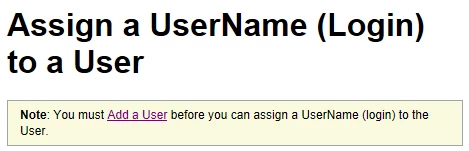
In IE 11, not using Document Mode=Edge, the CSS is applied as expected:
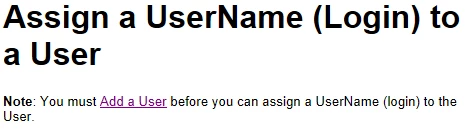
In IE 11, using Document Mode=Edge, the CSS is not applied as expected:
I suspect the issue is with the CSS itself. The CSS displays correctly in the Design view of the topic in RH10, but does not display correctly if I view the topic using the CTRL+W command from within RoboHelp, and does not display correctly in the compiled project when viewed in Chrome or FireFox. Any ideas? Thanks!


 AdChoices