
Question
CSS opens in SharePoint Designer instead of Styles dialogue box
Using RH 2015, I am trying to edit the CSS sheet for an HTML5 screen layout. I don't know what I did, but before I did "it", the .css file in Output Setup had a Notepad-like icon and I was able to open it in the usual dialogue box. The layout elements looked like this:
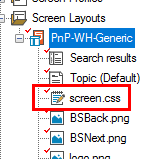
Then after the unknown event, most of the objects' icons turned into the baggage file icon, including the one for the css:
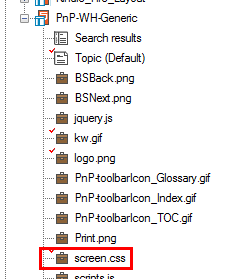
Worse yet, when I double-click the file now, it tries to open SharePoint Designer. I captured the first image in this post from a separate project after I found this problem, so this is not a RoboHelp-wide problem. How do I fix it?


 AdChoices