
Inspiring
February 22, 2013
Question

Custom bullet suddenly shown incorrectly when generated

  • February 22, 2013
  • 1 reply
  • 894 views

Please  help  - need fix!!

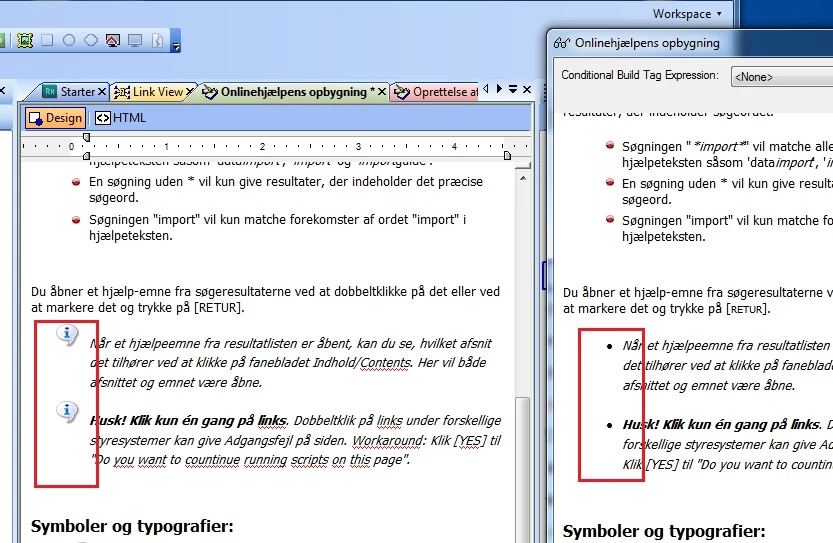
I'm working with RH 9 and have several projects based on the same CSS. Yesterday in one of the projects, one of my custom bullets suddenly became incorrectly depicted in view or generated form.

Everything looks fine in the editor but when viewed or generated, it changes. However only on of many custom bullets?

In the default CSS the bullets look similar in HTML:

This one works fine:

<ul>

<li class="p-tip"><p class="tip">Text.</p></li>

</ul>

This one is the troubled one:

<ul>

<li class="p-Vigtigt"><p class="Vigtigt"><span style="font-weight: bold;">Text.</p></li>

</ul>

Enclosed: screen shot of custom bullet in editor and in viewer
This topic has been closed for replies.

1 reply

Willam van Weelden
Inspiring
February 23, 2013

HI,

What is the CSS definition for the list? I see two possible causes:

1. The image was removed from the project and the browser defaults back.

2. Your CSS definition is off.

Greet,

Willam

LykkeErikAuthor
Inspiring
February 25, 2013

Thanks William,

I suspected as much, because I came to a dead end at any other avenue I tries.

What is it the screwes up the CSS? It happened out of the blue?

By thrawling the CSS in HTML mode I came across a discrepancy between: P and LLp list-style:url, see below:

P.Vigtigt {

line-height: Normal;

font-style: italic;

font-weight: normal;

x-next-class: ;

x-next-type: P;

margin-left: 14pt;

margin-bottom: 4pt;

margin-top: 10pt;

list-style: url(../../about.png);

}

LI.p-Vigtigt {

line-height: Normal;

font-style: italic;

font-weight: normal;

list-style: url(about2.png);

}

Now I know where to look, but I'm not happy with not knowing what triggered it? Does RH have a cache problem??

Willam van Weelden
Inspiring
February 25, 2013

Hi,

You cannot specify a list item image in the paragraph style. Remove it there and point to the correct image in the list style. This is a problem commonly found when upgrading from RH7 or prior to RH8/9. Did you by any chance upgrade?

As to what happened to the CSS, that's hard to tell. RoboHelp 9 sometimes has problems with some custom CSS, but that only occurs when you create your CSS manually. I don't know of CSS problems in RH that would cause this. Perhaps someone decided to do some CSS editing herself?

Greet,

Willam