

Custom Search bar location?
Hello RoboHelpers!
We're using the latest version of RH 2017. We're re-designing our intro / default landing page that our users come to in our large HTML5 merged help system:
Here's our Help in its full context view:
Here's our Help if you open just the intro page in it's own tab:
https://docs.hexagonmi.com/pcdmis/2020.2/en/helpcenter/mergedProjects/helpcentertopics/intro.htm
What we're hoping to accomplish:
If it's possible, we want to somehow add the layout's Search bar directly onto our intro/default page... like in this admittedly rough mockup when it's by itself:
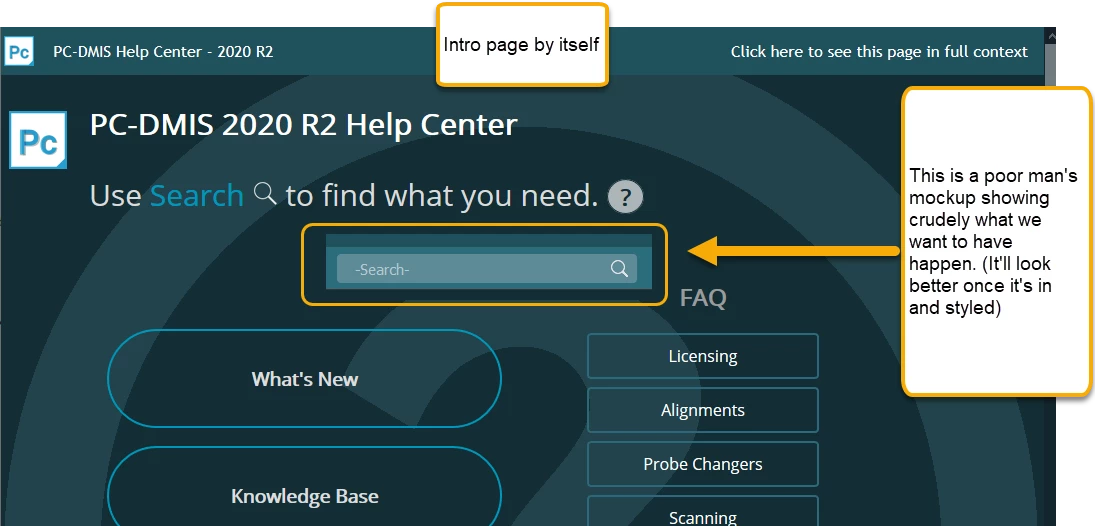
The idea is to make the Search bar more prominent.
We're not against getting into the code and customizing things to do this, but we don't want to to spin our wheels if such a thing is not even possible.
As a test, I found the area that holds the search bar is in the auto-generated index.htm that RoboHelp creates for us. I see a <div></div> block there that corresponds to the Search on the top right of the context view:

I tried to copy and paste it into my intro.htm. As I suspected, the field appears (without styling), and it doesn't do anything either. Our main concern is how do we tell it to run RoboHelp's search script once it's in the intro.htm page.
Any thoughts or recommendations from any code gurus out there would be helpful!
Thank you in advance,
Jared


 AdChoices