September 30, 2009
Answered

Customize WebHelp Window

  • September 30, 2009
  • 1 reply
  • 1323 views

I need a very streamlined WebHelp window for a specific help system:

     1. How do I hide the navigation area so that it doesn't show when the user opens help but they can choose to view the navigation at a later time?

     2. How do I hide the typical toolbars that show in the Web Browser when WebHelp opens? Similar to Microsoft Help in Word or Excel.

     3. I know how to create a window for a help system but I do not know how to tell WebHelp to use the window... how do I do this?

Thank you!
    This topic has been closed for replies.
    Correct answer Captiv8r

    Thank you, Willam. So sorry to have misspelled your name in my earlier post.

    I have made this all work to this point and have started to understand the process better... I even made it through a lot of Peter's site... you're right--it is very helpful!

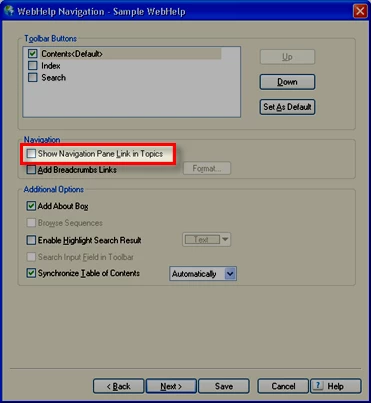
    I have one last question that I cannot answer... When I test my Context-Sensitive Help a link appears at the top called "Show". When it is clicked, the navigation for the WebHelp Help system opens... pretty cool. However, I would like to remove this link and let the developers add that button to the toolbar. Do you know how this link is controlled?

    Again, thanks very much for you help and the discussion. I really appreciate your time!

    --Susan


    Hi Susan

    I'm not Willam of course, but to remove the link, you edit the layout properties. Display yout Single Source Layouts pod. (View > Pods > Single Source Layouts)

    Right-click the layout and choose Properties.

    Click Next >

    There you will find an option to control whether you see the Show link.

    Cheers... Rick

    Helpful and Handy Links

    RoboHelp Wish Form/Bug Reporting Form

    Begin learning RoboHelp HTML 7 or 8 within the day - $24.95!

    Adobe Certified RoboHelp HTML Training

    SorcerStone Blog

    RoboHelp eBooks

    1 reply

    Willam van Weelden
    Inspiring
    October 6, 2009

    Hi,

    1. You control this behaviour from the window, choose one pane instead of two. Note that this will open the specified topic, if you want your users to show navigation later on, check the option Show Navigation Pane Link in Topics in the WebHelp navigation dialog.

    2. What do you want? Do you want the webhelp to appear as a popup, with no URL, menu and status bar? I know that using Topic ID's allows you to do this. See this article on Peter's site.

    3. Start reading on Peter's site, you'll find some information on calling the help. Alternatively, you can use the following URL to call your help:

         Your_topic.htm#<id=idnumber>>java=true>>wnd=Your_window_name, such as:

         First_topic.htm#<id=2000>>java=true>>wnd=NewWindow

    Greet,

    Willam

    October 20, 2009

    Thank you, Willam. Where do you set one pane rather than two in RoboHelp? I have tried to set this in the WebHelp window configuration area, but when I save the changes, it still shows 2 panes. I would like the navigation to be available, but only when the user clicks a certain button on the Help toolbar. This is how Word 2007 performs at this time.

    Yes, I want the URL bar, tabs, and the browser toolbar to disappear when someone clicks the Help button.I am looking to create something similar to the Help window available in Word 2007 for applets or widgets. I am not a programmer, so Peter's site is a bit difficult for me to understand but I will continue to look in it for ideas.

    Do you have any other ideas for creating help for a widget or applet? We will have an overall Help system created in WebHelp that covers all areas of the software, but each widget will need some online help as well. We want the help to be small (like the widget) and targeted to just the information available for that widget. My only solution at this time is to call a window as context-sensitive help, even though it would act more as a mini help system... how does that sound?

    Thanks for discussing this with me and brainstorming some ideas!

    --Susan

    Message was edited by: Captiv8r - Corrected spelling of Willam's name.

    Jeff_Coatsworth
    Community Expert
    Community Expert
    October 20, 2009

    Psst - it's Willam (not William)