


Question
Customized Numbered List Style Continues Numbering Rather than Starting at 1.
I am using RoboHelp 2019 Update 5.
I upgraded a RoboHelp 2015 Classic project into RoboHelp 2019 (not classic)
1. I have a customized style (Steps) that numbers items (much like <ol>).
2. I am using it in drop-down text.
- When I open the second, third, fourth, etc. drop-downs, the numbering continues rather than restarting at 1.
- Let's say I have 4 drop-down text paragraphs of 4 steps each. Rather than four steps numbered 1 -4 for each drop-down, I get four drop-downs with steps numbered 1 - 16. Oh, BTW it's dynamic. If I open drop-downs 1 and 4, I get two paragraphs of steps numbers 1 - 8.
- Also, if I interrupt the steps:
1. The numbering restarts at 1 (as in this example).
2. Rather than continuing with 3.
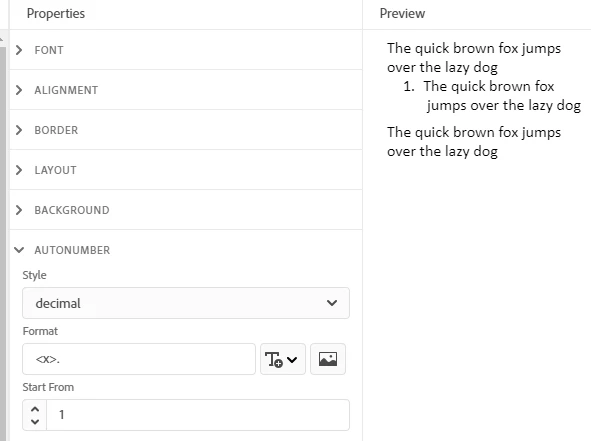
The "Start From" property of the style is 1. I think that is the issue. In 2015 Classic I could right-click on the offending renumbering, select List Style..., activate "Restart Numbering At:, enter the restart number, click OK and be happy.
Is there such a work around in RoboHelp 2019? Here are the Autonumber properties for the customized style
 AdChoices