
November 20, 2009
Question

Customizing toolbar button in RoboHelp

  • November 20, 2009
  • 2 replies
  • 1070 views

I am currently using RoboHelp X5 and generate my project in WebHelp layout.

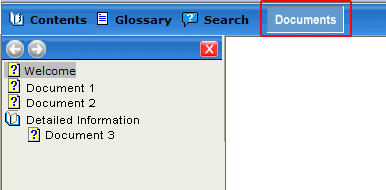
I wanted to know if I can add my own tab as a toolbar button. When generating, you can select to show the Contents, Index, Glossary and Search tabs. I want to add my own tab with a navigation pane and TOC similar to the Contents tab? I can't seem to figure it our in v5. Is it doable in another version?
Thanks.

This topic has been closed for replies.

2 replies

November 20, 2009

Sorry posted incorrectly

Captiv8r
Legend
November 20, 2009

Hi there

Definitely possible. You do it in the Skins editor. You have already been there or the button wouldn't be showing. All you need to do now is to edit the item and add in the static and the mouseover images.

Cheers... Rick

Helpful and Handy Links

RoboHelp Wish Form/Bug Reporting Form

Begin learning RoboHelp HTML 7 or 8 within the day - $24.95!

Adobe Certified RoboHelp HTML Training

SorcerStone Blog

RoboHelp eBooks

November 20, 2009

Wow, I didn't expect such a speedy response.

I added the text. But how do I create a new navigation pane, with specific links, when I select the new tab? I would like it to look like the contents nav pane but with different links. I glanced at "Creating Your Own FlashHelp Skins" but don't know Flash at all. http://www.adobe.com/devnet/robohelp/articles/flashhelp_skins_print.html

Thanks.

I am a new user to RoboHelp and took over for someone who left a few months back.

MergeThis
Inspiring
November 20, 2009

Sorry, but that's not possible.

You can only link to topics and external files (like pdf files, etc.). Perhaps if you expand on what you were hoping to provide in this navigation pane, we might suggest somethin.

Good luck,

Leon