


Inspiring
July 18, 2023
Answered

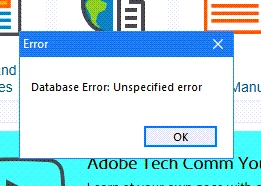
Database Error: Unspecified error prompt when opening RoboHelp 2017

  • July 18, 2023
  • 6 replies
  • 724 views

Version: 13.0.0.257

I receive this error prompt every time I open my project in RoboHelp 2017. I can edit, generate new layouts, etc., without any issue. How do I get rid of this message? Thank you in advance.
 

    This topic has been closed for replies.
    Correct answer LisaLederer

    I appreciate everyone's thoughts. Fortunately, we plan to upgrade RoboHelp soon.

    6 replies

    Community Expert
    July 25, 2023

    I agree. I'm out of ideas. And RH2017 is so old now I've forgotten a lot of the old troubleshooting steps. 🙂

    LisaLedererAuthorCorrect answer
    Inspiring
    July 26, 2023

    I appreciate everyone's thoughts. Fortunately, we plan to upgrade RoboHelp soon.

    Community Expert
    July 25, 2023

    If you used the RH interface then the suspect files shouldnt be in source control. But you could manually check in sharepoint just in case.


    Make sure the following files are not in source control: cpd, ldb, pss.

    Inspiring
    July 25, 2023

    Thank you, I checked and they are not in the source control.

    Jeff_Coatsworth
    Community Expert
    Community Expert
    July 25, 2023

    I think we're at the point now where you need to ping the RH folks - see the info @Amebr provided.

    Community Expert
    July 20, 2023

    It could be. Did you add the project to sharepoint using the Robohelp interface or did you manually upload it to sharepoint? If you manually uploaded it there are several files you should make sure aren't in source control, the main one being the *.cpd file. I'll have to look up the full list as it's been a while. Let us know which method you used.

    Inspiring
    July 24, 2023

    I used the RoboHelp interface. I often delete teh .cpd file just to clear the cache from time to time.

    Community Expert
    July 20, 2023

    I was thinking maybe you had the project on a network drive and that was corrupting things. But as it's on your c drive that shouldn't be the case.

    I think you need to contact support. See the following page for support contact options. The email address on this page is recommended as it goes to a dedicated Robohelp team.
    https://helpx.adobe.com/contact/enterprise-support.other.html#robohelp

    Inspiring
    July 20, 2023

    Thank you! The version control is saved to SharePoint. Would that cause the error message?

    Jeff_Coatsworth
    Community Expert
    Community Expert
    July 20, 2023

    Are you checking out the project from SP to work on it locally?

    Community Expert
    July 19, 2023


    Where is the project located? On your C drive or on a network share, or cloud storage drive like OneDrive?

    Inspiring
    July 19, 2023

    It is saved on my C drive. 

    Jeff_Coatsworth
    Community Expert
    Community Expert
    July 18, 2023

    Sounds like a corrupted db - you can (outside of RH with RH being closed) delete/rename the project's .cpd file & then start it back up. The file will be rebuilt upon opening the project.

    Inspiring
    July 18, 2023

    Thanks, I just tried that, but the error message still pops up when opening the project file. Any other ideas?