
Inspiring
January 13, 2024
Answered

Decrease the font size in the header of Azure Blue (Robohelp 2022.3.93

  • January 13, 2024
  • 2 replies
  • 314 views

I need to decrease the font size in the header of Azure Blue, but I don't see the property.

How can I change the font size?

The other option would be to increase the height of the header, but I don't see that property either.
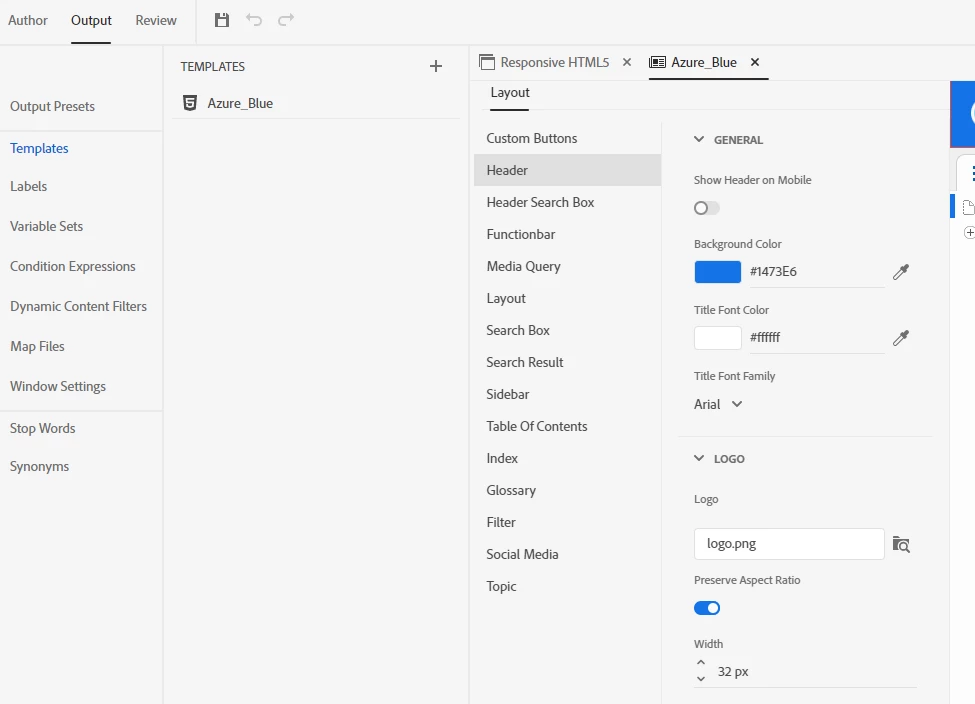
 

Any suggestions would be appreciated.

Thanks.

    This topic has been closed for replies.
    Correct answer Amebr

    I think you'll need to inspect the output using the browser developer tools to find the style that needs to be changed, then add that to a custom css file, which you will then need to add in the User Assets section of the skin.


    If you have the option, consider changing to a Frameless output, as there are more customisation options avalable. (Do note that if you use context sensitive help, you may need to ask the developers to change their help call, depending on how it's been implemented.)

    2 replies

    Community Expert
    January 14, 2024

    I'll try to have a look tonight to see if I can help.


    Also, if you want to customise things, even in Frameless, it really helps to brush up on html and css. the w3schools site has tutorials and a handy "try it" feature built in so you can play around to test your understanding. https://www.w3schools.com/css/default.asp


    It isn't hard, although it can look intimidating at first. on the W3 schools page, I'd suggest Home, Intro, Syntax and Selectors to start, then maybe jump down to Text and Fonts to get a bit more familiar with things. Once you're feeling more comfortable, Margins and Padding are common things people want to adjust. Then just pick sections that you are interested in and you'll eventually cover everything. 🙂


    Mozilla (MDN) also has really good tutorials. https://developer.mozilla.org/en-US/docs/Learn/Getting_started_with_the_web


    Inspiring
    January 15, 2024

    Thank you for your additional information. Yes, I need to brush up on css.

    I fiddled around with Frameless output and realized that this is what I was looking for. Thanks!

    So you don't have to look into customizing the Azure Blue (responsive html5) output.

    AmebrCommunity ExpertCorrect answer
    Community Expert
    January 14, 2024

    I think you'll need to inspect the output using the browser developer tools to find the style that needs to be changed, then add that to a custom css file, which you will then need to add in the User Assets section of the skin.


    If you have the option, consider changing to a Frameless output, as there are more customisation options avalable. (Do note that if you use context sensitive help, you may need to ask the developers to change their help call, depending on how it's been implemented.)

    Inspiring
    January 14, 2024

    Amebr, thank you for your response. I'll do some digging to figure out what the heck you're talking about (I'm new to RoboHelp). 🙂