
Inspiring
February 5, 2018
Answered

Deep Links, URLs Not Resolving, RoboHelp 2017 Responsive HTML5

  • February 5, 2018
  • 7 replies
  • 1557 views

Hello forum folks! I need your expertise once again...

I am using RoboHelp 2017 and have a parent project set up with multiple child projects. I am converting from WebHelp to Responsive HTML5. All the projects' files are generated/compiled and everything is working EXCEPT the deep links for my context sensitive URLs to my child projects. I thought that it was something to do with our software, but cannot find anything. Here's the scoop:

Prior to the change my URL looked like this:

http://SERVERNAME/Eclipse-Help/Solar/!SSL!/WebHelp/MasterProject.htm#mergedProjects/ENT/VEND_CreatingVendorRecords.htm

Our system houses everything prior to the # in a reference file for the system to call.

I load the folder and file name on each screen (i.e. ENT/VEND_CreatingVendorRecords.htm)

When we launch the help from an individual screen, our software inserts the #mergedProjects, appends the folder/file for a complete URL.

These worked fine with WebHelp. I thought I could just replace the "WebHelp" with "ResponsiveHTML5" and all would be right with the world:

http://SERVERNAME/Eclipse-Help/Solar/!SSL!/ResponsiveHTML5/MasterProject.htm#mergedProjects/ENT/VEND_CreatingVendorRecords.htm

Alas, while the master online help displays, the system does not display the .htm file for the screen, but stops at the overall landing page from the master project. I know the files are there because I can drill into them through the TOC. Also, it seems to be tacking on this string at the end: =&t=index.html. Even after removing this appendage, the screen does not display but stops at the index.html file:
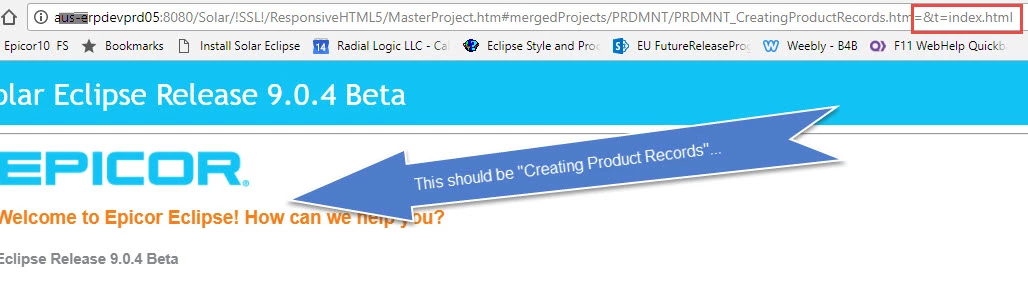
I've tried different servers, browsers, files, pages, etc.

Has anyone seen this happen with deep links? Am I missing something in the Output Layout setup, for example, does RoboHelp require that there be a space in the Responsive HTML5 folder? OR is it indeed something on our system?

HELP. Any thoughts?

This topic has been closed for replies.
Correct answer Amebr

I had a quick test, and navigating the TOC in responsive output in RH11 always puts #t= after the parent index.html, then the path to the selected topic. So try #t=mergedProjects rather than just #mergedProjects and see if that works.

(Also, I just tried on my c drive and had to flip the forward slashes after the # symbol to back slashes. But that might not be necessary on a webserver - I don't know enough about it to be sure.)

7 replies

Peter Grainge
Community Expert
Community Expert
September 19, 2019

Case sensitivity does not mean lowercase. It means it must be the same. All caps would work as long as links and target are the same.


Use the menu (bottom right) to mark the Best Answer or Highlight particularly useful replies. Found the answer elsewhere? Share it here.
Jeff_Coatsworth
Community Expert
Community Expert
September 19, 2019

IIRC case sensitivity was needed to accomodate output to be hosted on Unix boxes.

Peter Grainge
Community Expert
Community Expert
September 19, 2019

Nicole - Unless I am missing something in this thread as I can't stop to reread it all, RoboHelp only generate lowercase outputs if you tell it to in the presets. If the checkbox is left cleared, it leaves the case alone. Did I miss something?


Use the menu (bottom right) to mark the Best Answer or Highlight particularly useful replies. Found the answer elsewhere? Share it here.
TechWriter1025
Known Participant
September 20, 2019
I see that option in the WebHelp output but not the responsive HTML5 (what I'm using)...unless it's someplace else? I'm not finding it anywhere.
Legend
September 20, 2019
HTML5 Output, Tab "General", second to last checkbox "Use lowercase file names"
Peter Grainge
Community Expert
Community Expert
September 13, 2019

@Nicole - There is a topic on my site about Calling Help. Maybe that will help.


Use the menu (bottom right) to mark the Best Answer or Highlight particularly useful replies. Found the answer elsewhere? Share it here.
TechWriter1025
Known Participant
September 17, 2019
Thank you Peter. I'll enlist the help of a web programmer!
TechWriter1025
Known Participant
September 12, 2019

I believe I'm having a similar problem but am unclear about the solution: I have a merged HTML5 project that is context sensitive. It is beamed to our comm server where the clients download it and run locally. When a topic is invoked, the correct topic appears (the CSH is not an issue) with the "Click for Table of Contents" message in the header. Before clicking for the TOC, the topic displays correctly and linking works as expected. However, after invoking the TOC, the browser misbehaves and the topic links do not work (you must open in a new tab or window, which is not ideal).


The actual reaction depends on the browser:

Chrome - TOC loads continuously, never resolves. Receive a "Page Unresponsive" message.

Fire Fox - Page freezes, receive message "A web page is slowing down your browser."

IE11 - After accepting the warning about running scripts or ActiveX controls, TOC loads nicely and works although topic links fail.

Edge - Page freezes.


Here's the URL before the TOC is invoked:

Here's the URL after the TOC is invoked:

I noticed the "extra" information in the second URL. Is this the culprit for both the load issues and the link failures? Or are there browser settings that clients must set? Or a combination of both?

TechWriter1025
Known Participant
September 12, 2019

I believe this issue is similar to what I'm experiencing, though I'm not clear on the solution: I have a merged HTML5 project that is context sensitive. The CSH part is working. What's not working is when the parent is invoked--the exact reaction depends on the browser, but in Chrome, Fire Fox, and Edge, it either freezes or continously loads. In IE11, it works fine except--and this part applies to all browser types--the child project links don't work although the topic will open if the link is opened in a new tab (not ideal).


A little more detail: I'm using the Azure_Blue layout for parent and children; the parent is slightly modified (color changes, no big overhauls or anything) and the children are left as-is. When the topic is invoked from our software, the header indicates "Click here for the Table of Contents" and once clicked, the freezing/link failing begins.


Here's an example of a link BEFORE the TOC is invoked:

And here's an example of a linke AFTER the TOC is invoked:


I noticed that extra characters are added, which probably explains the failing links. But 1) how can that be fixed and 2) is this the cause of the freezing?

AmebrCommunity ExpertCorrect answer
Community Expert
February 6, 2018

I had a quick test, and navigating the TOC in responsive output in RH11 always puts #t= after the parent index.html, then the path to the selected topic. So try #t=mergedProjects rather than just #mergedProjects and see if that works.

(Also, I just tried on my c drive and had to flip the forward slashes after the # symbol to back slashes. But that might not be necessary on a webserver - I don't know enough about it to be sure.)

Inspiring
February 6, 2018

Thank you! My initial tests are working...that looks like it might be it!

Inspiring
February 6, 2018

Thanks Amebr! This was the correct answer.