stentec514
Known Participant
September 9, 2014
Answered

Default bullet RH 11

  • September 9, 2014
  • 1 reply
  • 829 views

Unordered list are a problem for me. How can I change the default bullet for all bulleted unordered lists in my projects made in RH 11?

I can change them manually for each list again and again but there must be a way to change the default so I can simply use the button in the menu.

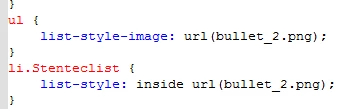
I tried to make changes in the HTML editor for styles. Without succes.

Where/how must I use List-style-image?

Aart Korstjens
This topic has been closed for replies.
Correct answer Peter Grainge

Peter,

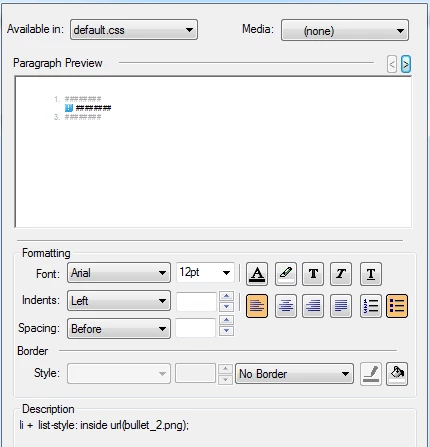
When I open Styles/List Styles/Edit Selected item, I see the image somewhere in "Paragraph Preview".

When I open the default.css in the Project Manager by clicking Edit or Edit with CSS Manager I see the same.

When I open the default.css by clicking Edit with HTML editor or open it in my Dreamweaver program I see

I hope I gave you enough information now.

Aart


I get the feeling you are not familiar with the Styles Pod. Look in View > Pods and select Styles and Formatting. Then select List styles in the dropdown. You need to define a style there.


See www.grainge.org for RoboHelp and Authoring tips

@petergrainge

1 reply

Willam van Weelden
Inspiring
September 9, 2014

If you add a style UL to your CSS and set list image styling in the css, it will work for all unordered lists. Note that RoboHelp list styles can overwrite any styling set for the UL

Unfortunately, I don't believe you can add this style through the CSS editor, so you will have to add it to your CSS manually:

ul {

list-style-type: square;

}

For available styling, please see CSS list-style property

Though the styling will work, you won't see it correctly in RoboHelp Design Editor. This is because RoboHelp adds the list style to every list you create. Browsers correctly show the styling from the CSS, but the design editor doesn't.

Kind regards,

Willam

Peter Grainge
Community Expert
Community Expert
September 9, 2014

For single level lists, you can use an image in the Rh editor. Go to the Styles pod, right click and select New > List Style and click the bullet icon, then you will see an option to add an image or select a different bullet.


See www.grainge.org for RoboHelp and Authoring tips

@petergrainge

Use the menu (bottom right) to mark the Best Answer or Highlight particularly useful replies. Found the answer elsewhere? Share it here.
stentec514
Known Participant
September 9, 2014

Peter,

In the styles pod I cannot add an image in RH11.