



SandraDCF
Known Participant
Sep 26, 2017 2:39 PM UTC
Question

Deleting Extra Files from Project Manager

Recently, I uploaded a new Word document into my RoboHelp project which contains a table. When I did this, I expected that it would show up as a new topic. But in addition to the new topic (Assessment Tool Icon Guide), a folder appeared with three gif files.
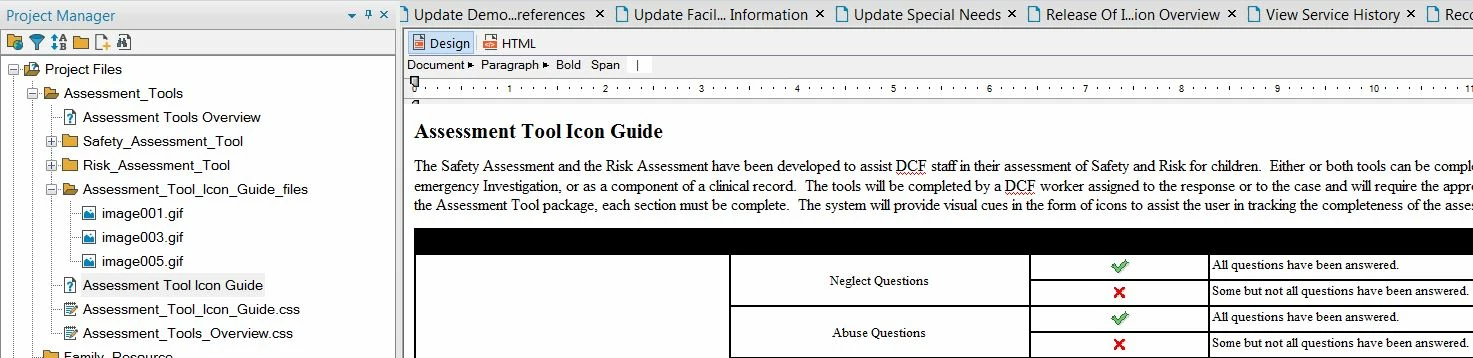
Why did this occur? Additionally, is there a way to delete these files? Is there a way to prevent this from happening to give the Project Manager a cleaner look, since we'll be importing it into our web application?

This topic is closed to new replies. Start a new post to keep the conversation going.

3 replies

Jeff_Coatsworth
Community Expert
Community Expert
Sep 26, 2017 2:45 PM UTC

What are the GIF images showing? I would suspect they are the icon images in use in your topic...

Translate
SandraDCF
SandraDCFAuthor
Known Participant
Sep 26, 2017 3:13 PM UTC

Yes, they are the icon images.

Translate
Jeff_Coatsworth
Community Expert
Community Expert
Sep 26, 2017 3:18 PM UTC

Ok, so that makes sense then - your Word doc had the images added by reference & the resulting RH topic copied them in too. No problem.

Translate