alaaa39293643
Known Participant
October 5, 2017
Answered

Deleting Folder

  • October 5, 2017
  • 2 replies
  • 704 views

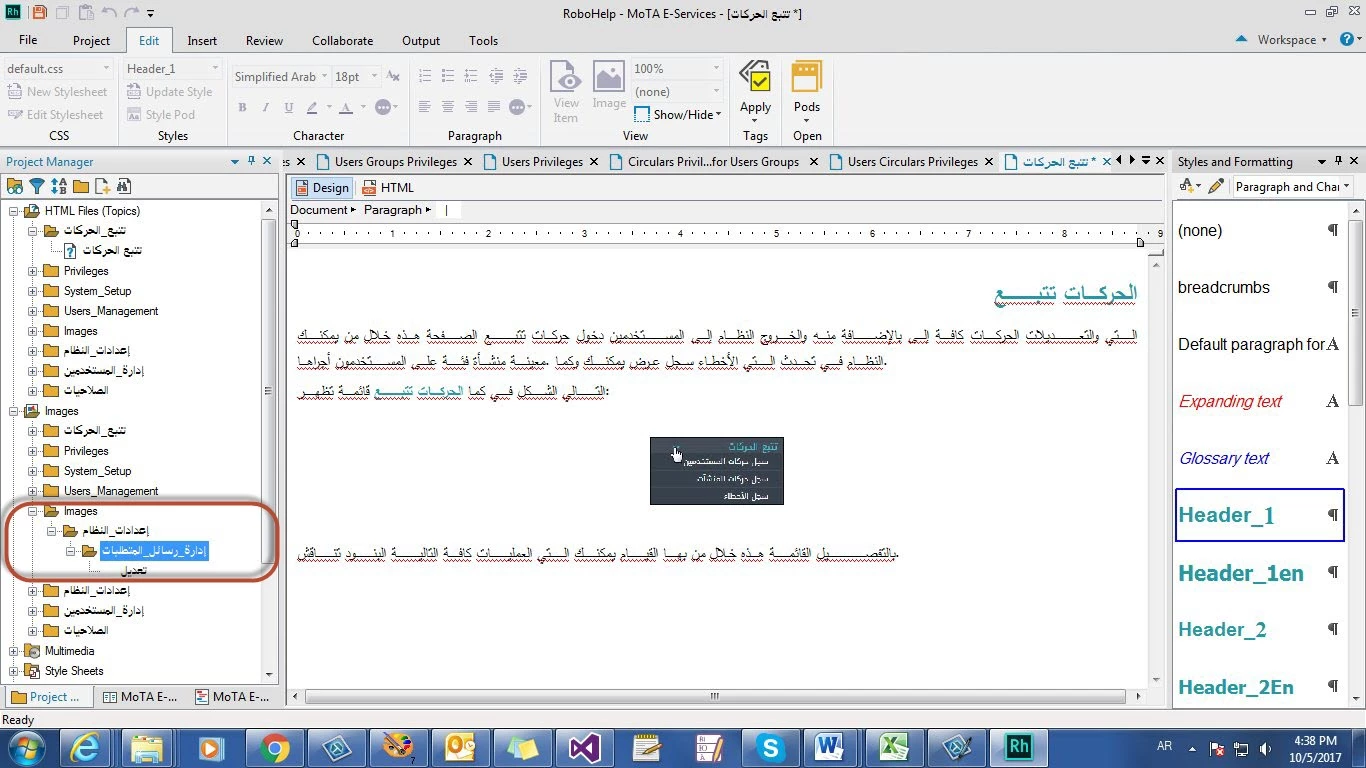
I want to delete this folder.. but I can't

What Shall I do?
    This topic has been closed for replies.
    Correct answer Captiv8r

    Hi there

    I'm not sure what language is being used, so I cannot confirm what the actual folder name is.

    By chance, do you have content that has been either linked or imported from Microsoft Word?

    If so, and the Word document contains images, we regularly see Word itself causing an additional folder being created to store those images. For example, if you have a Word document that is named: ReallyCoolFile.DOCX, you would expect to see something like ReallyCoolFile_Files be created as a folder. And inside that folder would be images that were in the original document.

    Not sure if I've given you anything actually helpful, but perhaps it's a place to start looking?

    Cheers... Rick

    2 replies

    Germanedge Solutions GmbH
    Inspiring
    October 6, 2017

    Hi there,

    Could it be that there is still a document stored in the folder you want to delete (looks like it is on your screenshot). Try first deleting all content of your folder and then try again deleting the folder. As far as I know, only empty folders can be deleted.

    Hope this helps.

    Kind regards,

    Karin

    Captiv8r
    Captiv8rCorrect answer
    Legend
    October 5, 2017

    Hi there

    I'm not sure what language is being used, so I cannot confirm what the actual folder name is.

    By chance, do you have content that has been either linked or imported from Microsoft Word?

    If so, and the Word document contains images, we regularly see Word itself causing an additional folder being created to store those images. For example, if you have a Word document that is named: ReallyCoolFile.DOCX, you would expect to see something like ReallyCoolFile_Files be created as a folder. And inside that folder would be images that were in the original document.

    Not sure if I've given you anything actually helpful, but perhaps it's a place to start looking?

    Cheers... Rick

    alaaa39293643
    Known Participant
    October 8, 2017

    The folder name is in Arabic.

    I copy and paste from Word Document, then I delete the image and Insert it again.

    I don't know how to delete the one in blue circle.

    Germanedge Solutions GmbH
    Inspiring
    October 10, 2017

    Hm, does the file circled in blue not disappear after you save your document with the new image? Does this file you cannot delete have any properties (right mouse click - properties)? Is it used in any other file (right mouse click - properties - tab Used in)?

    Kind regards

    Karin
