


Inspiring
Aug 10, 2015 3:37 PM UTC
Question

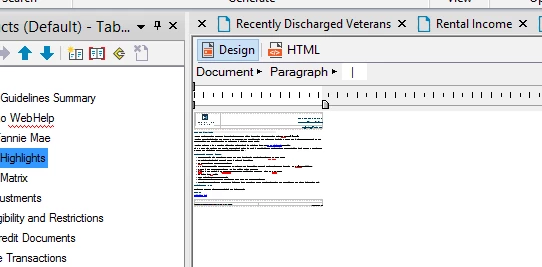
Design Editor mini view

RoboHelp HTML 2015

I dropped my mouse. Project was open and I was editing a topic. I dropped my mouse . . . and here's what happened. I exited without saving and came back in . . now all topics display as this. Any idea on how to restore to Normal view?
    This topic is closed to new replies. Start a new post to keep the conversation going.

    4 replies

    Peter Grainge
    Community Expert
    Community Expert
    Aug 10, 2015 6:27 PM UTC

    Have you rebooted the machine and have you checked the view magnification?


    See www.grainge.org for RoboHelp and Authoring tips

    @petergrainge

    Translate
    Use the menu (bottom right) to mark the Best Answer or Highlight particularly useful replies. Found the answer elsewhere? Share it here.
    Community Expert
    Aug 11, 2015 12:39 AM UTC

    Hehe, I just tried View > Zoom > 33% and it looks pretty similar to the screenshot.

    Translate