Known Participant
October 20, 2022
Answered

Design Note/Warning/Recommendation

  • October 20, 2022
  • 3 replies
  • 338 views

Hi, 


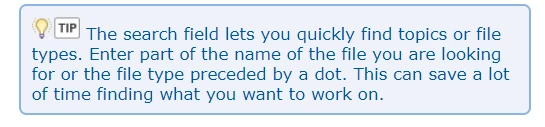
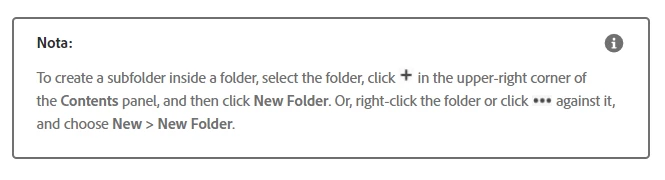
Could you guide me how to design in Robohelp these types of notes/warnings, recommendations? We use Robohelp 2020.8.34

I tried using a Table and a Text Box but I couldn't remove the borders or put a fill color on it.

I attached examples of designs.


Thank you so much.


    This topic has been closed for replies.
    Correct answer Peter Grainge

    You have obviously seen the style in the About RoboHelp sample project. Open it again and then open the CSS in the editor. Go to Source View and copy the Emphasis1 style into your own CSS.


    There you will be able to remove the border and change the fill colour.

    ________________________________________________________

    My site www.grainge.org includes many free Authoring and RoboHelp resources that may be of help.


    3 replies

    Known Participant
    October 24, 2022

    Hi


    Thanks for the contribution, I have designed it with your help.


    Best regards!

    Peter Grainge
    Community Expert
    Peter GraingeCommunity ExpertCorrect answer
    Community Expert
    October 21, 2022

    You have obviously seen the style in the About RoboHelp sample project. Open it again and then open the CSS in the editor. Go to Source View and copy the Emphasis1 style into your own CSS.


    There you will be able to remove the border and change the fill colour.

    ________________________________________________________

    My site www.grainge.org includes many free Authoring and RoboHelp resources that may be of help.


    Use the menu (bottom right) to mark the Best Answer or Highlight particularly useful replies. Found the answer elsewhere? Share it here.
    davidk99046111
    Inspiring
    October 20, 2022

    You can do it all via css.  You can define each as new styles - ether div or paragraph (like p.nota) in your css file.  Then all you have to do is select that style for the sentence/section in the topic and it will automatically be applied/formatted.