
Inspiring
January 10, 2017
Answered

Display of Conversion Settings dialog box looks strange in Windows 10

  • January 10, 2017
  • 1 reply
  • 1206 views

Hello,

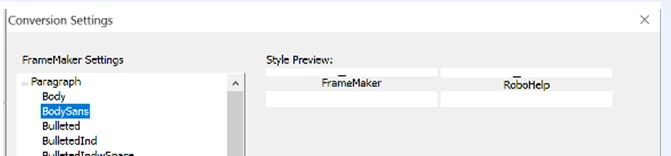
A new person started at my office and installed the TCS 2015 suite on her new Windows 10 laptop. While training her on the use of RoboHelp, we realized that she can't see the Style Preview text in the FrameMaker Conversion Settings dialog box (in Project Settings). The fields are strangely squished and don't display properly. I have never seen this before. All the rest of us are still on Windows 8.1 so I have to think this is a Win 10 problem.

I made sure she updated to all the latest FM/RH releases and rebooted her machine, but the problem is still there. Her graphics card is up to date.
I tried to file a bug about this and it looks like there's a new bug reporting system called "Tracker." Well, Tracker insists that you select items from drop-down lists, like "Platform" but there is nothing in the list to select from, in almost all of the lists. So you have to select something, but there's nothing to select, and you can't submit the bug. I would file a bug about the bug reporting system but I can't even do that.

Alexandra
This topic has been closed for replies.
Correct answer Alexandra Duffy

Good thought too, but changing the resolution to a variety of different settings had no effect at all on the squished Style Preview. We also clicked Advanced and changed the resolution that way and checked. No change.

Thank you for the idea.

Alexandra


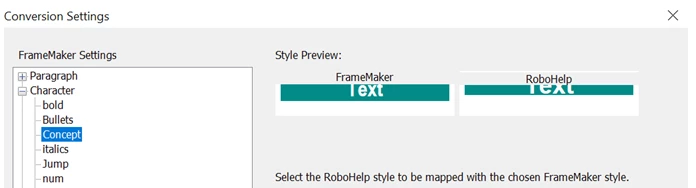
The new person says she ran a bunch of Windows updates last night and now the appearance of the dialog box is slightly better:

The fields are still slightly squished but not as badly. I'll just chalk this up to some strange Windows thing. She won't be creating styles or doing any conversion mapping for a long while, so I think I will move on to more pressing issues.

Thank you for the all the suggestions, however!

Alexandra

1 reply

Jeff_Coatsworth
Community Expert
Community Expert
January 10, 2017

Have a look at that property of the FM shortcut - Compatibility tab - Disable display scaling on high DPI settings?

Inspiring
January 10, 2017

Hi Jeff, You could be onto something, but I'm not sure where this FM shortcut - Compatibility tab is? I don't see it in the RoboHelp Options. Could you be more specific?

Thanks,

Alexandra

Captiv8r
Legend
January 10, 2017

I suspect he means the shortcut used to launch frame?

Cheers... Rick