
Display Problems w Responsive HTML5 Output
Hi, I've been testing the output of the Responsive HTML5 Layout in RH11 and have been running into some display problems for which I'd like some Help before we make a purchasing decision!
In our current version, RH9, the WebHelp output displays as shown:

The Desktop Screen Profile is set with its defaults of Width: Minimum 1296 and Maximum 99999.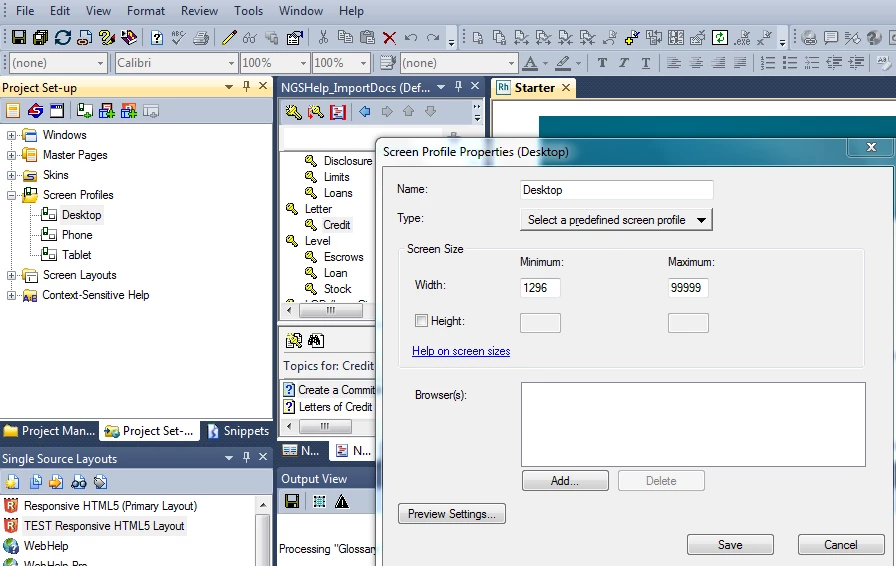
In RH11, the opening page Responsive HTML5 layout output displays as follows:
After clicking the TOC icon of the output, the Table of Contents topics display seemingly as expected (except it may be double spaced, but the content DOES flow across the page):
.PNG)
After clicking a topic to open it, the text does NOT flow across the page. Instead, it looks like this:
After opening a topic of the Table of Contents, that text also displays in a narrow band rather than flowing across the page.
.png)
Then I notice in the left bottom bar an Error on the page.
.PNG)
What do I need to do to ensure the text flows across the width of the page, the graphics aren't stretched, and the display spacing is single spaced rather than more than that?
Thanks for any and all help you can provide with this issue,
Jane


 AdChoices