
Participant
April 10, 2017
Question

"Display results with all search words" > change color of text?

  • April 10, 2017
  • 4 replies
  • 815 views

Hello All,

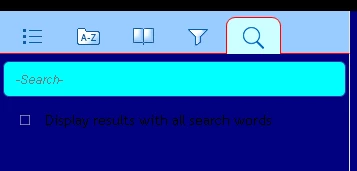
In HTML5 output, below the Search box (both the one in the top far right of the screen, and the one in the left navigation pane (pictured below), there is the following text: "Display search words with all search words." 

Can anyone tell me how to change the color of that text?

Also, can I change the wording of that text?

Thanks,

Mark

Here, the text is black, so it's barely visible:
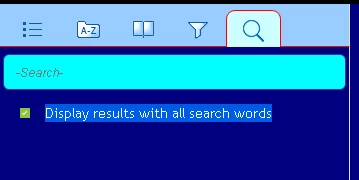
Here, I've simply highlighted the text with my cursor. This is the text whose color I want to change.
This topic has been closed for replies.

4 replies

Known Participant
December 21, 2017

Hmmm. I have the exact same issue in RoboHelp 2015, with the standard grey HTML5 screen layout. Tried both of these solutions and neither one worked. Any ideas why?

Known Participant
December 21, 2017

Figured it out. Line item in 2015 was named differently.

Daedalus321
Known Participant
August 7, 2017

This one drove me nuts. Here's the solution.

In the layout.css file, go about two thirds of the way through the file.

There was no color specified for that line, so I added a line of code.

-- Mark Thiel

Peter Grainge
Community Expert
Community Expert
August 8, 2017

My apologies for missing this one. That's a neat solution so why am I posting another one? Well it was given to me by someone involved in creating the layout.css so it may be that there is a reason for him giving me an alternative solution. If you find that some browser does not play nicely with your simpler solution, add this at the end of the layout.css file instead, changing the colour to whatever value you want including hex or rgb.

::-webkit-input-placeholder { /* Chrome/Opera/Safari */

  color: pink;

}

::-moz-placeholder { /* Firefox 19+ */

  color: pink;

}

:-ms-input-placeholder { /* IE 10+ */

  color: pink;

}

:-moz-placeholder { /* Firefox 18- */

  color: pink;

}


See www.grainge.org for RoboHelp and Authoring information

@petergrainge

Use the menu (bottom right) to mark the Best Answer or Highlight particularly useful replies. Found the answer elsewhere? Share it here.
Daedalus321
Known Participant
August 8, 2017

Your solution seems simpler to me. I don't know anything about coding. Finding the solution was murder.

Jeff_Coatsworth
Community Expert
Community Expert
April 11, 2017

You should be able to mess with the wording in the LNG file - depending on your version, you can access it via the Project Settings > Advanced button (beside the Language field) - then pick the LNG File tab. There's a [Responsive] section of terminology that you can play with. Looks like your "Display results with all search words" bit is handled by the "EnableAndSearch=" line.

Captiv8r
Legend
April 11, 2017

Nice catch Jeff! Somehow I managed to overlook that part of the issue.

Captiv8r
Legend
April 10, 2017

HI there

Unfortunately in the world of Responsive HTML 5, things aren't as cut and dried as one would hope. Likely you will need to take this a step further and tell us which of the Responsive HTML 5 layouts you are using. Also, what version of RoboHelp?

Cheers... Rick