October 12, 2011
Answered

Displayed title in output is not correct -- where is it coming from?

  • October 12, 2011
  • 2 replies
  • 1694 views

RH9, RH Server 9, IE8, WebHelp Pro

In Project Settings > Project Title we have the label we want the users to see in the WebHelp output browser title bar.

However, in the browser the displayed title in the top browser bar is different from what we have in the Project Settings > Project Title. How do we change this?

The Project Title in Project Settings > Project Title is Myproject

In the server output, the browser bar shows:

http://Myproject-test/robohelp/robo/server/general/projects/Myproject/Temp_Project_for_Myproject.htm

At one time we had the project named "{Temp_Project_for_Myproject" but we have changed it and we can't get rid of the old name in the output.

Any ideas?

--

Mike West
This topic has been closed for replies.
Correct answer Captiv8r

Hi there

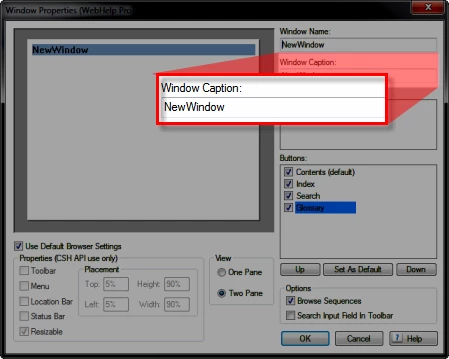
Wading into some unfamiliar waters here. I seem to recall that for WebHelp Pro, you have a Window definition. Have you tried looking there?

View > Pods > Project Set-up. Expand the Windows category and double-click the Window definition you should see there.

Cheers... Rick

Helpful and Handy Links

RoboHelp Wish Form/Bug Reporting Form

Begin learning RoboHelp HTML 7, 8 or 9 within the day!

Adobe Certified RoboHelp HTML Training

SorcerStone Blog

RoboHelp eBooks

2 replies

Captiv8r
Captiv8rCorrect answer
Legend
October 12, 2011

Hi there

Wading into some unfamiliar waters here. I seem to recall that for WebHelp Pro, you have a Window definition. Have you tried looking there?

View > Pods > Project Set-up. Expand the Windows category and double-click the Window definition you should see there.

Cheers... Rick

Helpful and Handy Links

RoboHelp Wish Form/Bug Reporting Form

Begin learning RoboHelp HTML 7, 8 or 9 within the day!

Adobe Certified RoboHelp HTML Training

SorcerStone Blog

RoboHelp eBooks

johndaigle
Legend
October 12, 2011

Yes, Rick is quite right. (he's just quicker at posting than me!) I tested on WebHelp Pro and what he shows is reliable. Just make sure you select the Custom "Window Name" from the Default Window dropdown on the WebHelp Pro Options dialog when generating and publishing.

Also be careful not to confuse the Project Name field (top of screenshot) with what should appear in the Title Bar (This threw me too!) That can have an unintended consequence of actually publishing your project to the server twice because the Project Name has changed!

I admit, this is not at all intuitive because regular WebHelp (not Pro) behaves quite differently. It used to be that what appeared in the browser title bar was defined in the File > Project Settings > Project Title. Now, in RoboHelp 9 it is WebHelp Settings > Title Bar. So the fact that this changes yet again for the Pro flavor is admittedly confusing. I will raise this with the Adobe team and see if this can be sorted out in a more consistent way in the next release.

John Daigle

Adobe Certified RoboHelp and Captivate Instructor

Evergreen, Colorado

www.showmethedemo.com

John DaigleAdobe Certified RoboHelp and Captivate InstructorNewport, Oregon
October 13, 2011

Thanks for this, but in a way I am sorry to hear this because I have not been able to resolve the issue we discussed last week regarding the new custom window that does not take effect. So this is apparently connected to that. Still working on it.

I wonder if anyone knows of a specific project file that I can manually edit to correct whatever the issue is.

Mike West

Peter Grainge
Community Expert
Community Expert
October 12, 2011

Does changing the Project Name in the dialogs where you generate the help affect what displays.

If not, hopefully one of the WebHelp Pro users will step in.


See www.grainge.org for RoboHelp and Authoring tips

@petergrainge

Use the menu (bottom right) to mark the Best Answer or Highlight particularly useful replies. Found the answer elsewhere? Share it here.