

Jared Hess
Legend
February 26, 2010
Question

Doc File Import is not Splitting on Style Appropriately

  • February 26, 2010
  • 1 reply
  • 330 views

Hello fellow RHelpers,

I'm trying to import a .doc file into my proejct (RoboHelp HTML). The doc file has one topic with a Heading 3 file and ten sub topics with a Heading 4 styles. During import, I want RH it to break these up as 11 individual topics (one for each topic heading). However, it only recognizes the Heading 3 style and would therefore only create a single long topic.

Is there anyway to force it to recognize and properly split on the Heading 4 styles? It doesn't appear as one of the styles to split topics on when I choose to import only the Heading 3 style appears:
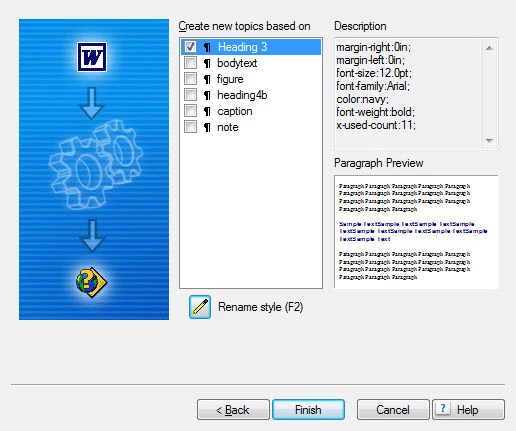
On a previous import of a different .doc file I actually tried setting all the heading 4s to heading 3s and importing that way, but it still only created a single topic using the first Heading 3. Any ideas on what's going on and how to fix it?

Thanks in advance,

Jared

Using the latest RH7 with Windows Vista 32 bit OS and Word 2003 w/ SP3

    This topic has been closed for replies.

    1 reply

    Peter Grainge
    Community Expert
    Community Expert
    February 27, 2010

    Often the answer to this problem is that someone has created a style called Heading nn but it is not a true Heading style as Word understands it. That should have been overcome by changing the styles to Heading 3 as that is recognised.

    Any reason you cannot apply Heading 1?


    See www.grainge.org for RoboHelp and Authoring tips

    @petergrainge

    Use the menu (bottom right) to mark the Best Answer or Highlight particularly useful replies. Found the answer elsewhere? Share it here.
    Jared Hess
    Legend
    March 1, 2010

    I tried changing them to the Heading 3 style again and only two of the 11 were properly split into topics. So, I again had to manually create the other topics and copy paste in the content. Next time I have to import something like this, I'll try Heading 1 and see if that makes any difference.