Inspiring
March 24, 2023
Answered

Documents not showing when I try to import Baggage files

  • March 24, 2023
  • 2 replies
  • 238 views

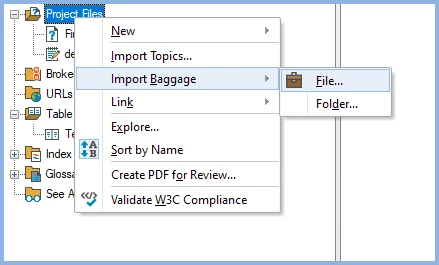
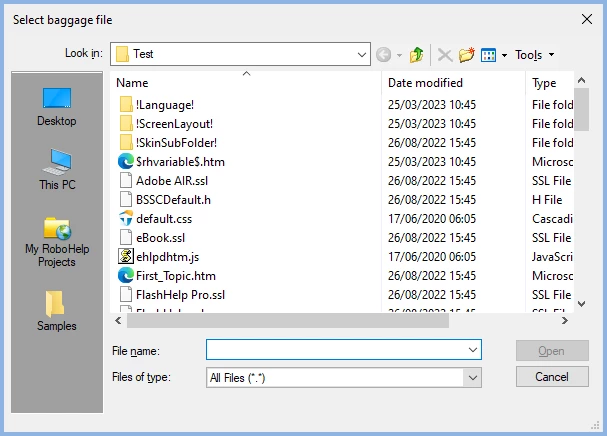
I need to import a PDF file as a baggage file (RH2017), but a curious thing is happening: I go through the Printed Documentation procedures, generating a Word doc and a PDF; these do appear on my K: drive, as usual. But when I try to import the PDF using RH's Select Baggage file, neither of the documents appear. I need to fix this ASAP.


thank you,

Lon

    This topic has been closed for replies.
    Correct answer Peter Grainge

    This dialog opens a browse window from where you locate the required file.


    ________________________________________________________

    My site www.grainge.org includes many free Authoring and RoboHelp resources that may be of help.


    2 replies

    Peter Grainge
    Community Expert
    Peter GraingeCommunity ExpertCorrect answer
    Community Expert
    March 25, 2023

    This dialog opens a browse window from where you locate the required file.


    ________________________________________________________

    My site www.grainge.org includes many free Authoring and RoboHelp resources that may be of help.


    Use menu (bottom right) to mark as Best Answer or to Highlight particularly useful replies. Found the answer elsewhere? Share it here.
    Jeff_Coatsworth
    Community Expert
    Community Expert
    March 24, 2023

    Does it all work if you manually copy the PDF into the output folder (outside of RH)?

    Inspiring
    March 24, 2023

    Hi, Jeff...

    Actually, I discovered part of the problem: I don't know how it happened, but the Select Baggage File feature is pointing to my C: drive, whereas it is supposed to (and used to) point to my K: drive. So, the question now becomes: How do I change the path for the Select Baggage File feature?