
Inspiring
February 14, 2020
Answered

Double-Quotes in Glossary Definitions Publish with a Backslash

  • February 14, 2020
  • 21 replies
  • 1010 views

Environment:

  • Win10
  • RoboHelp 2019.11 New
  • Frameless
  • Orange (modified)


Create this in RoboHelp:
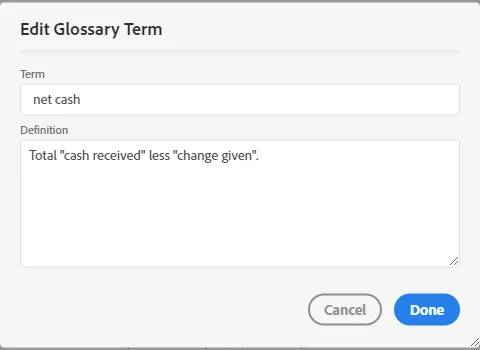
 

How it appears in the output:
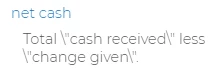
 

Problem:

The build/compile process is inserting a backslash immediately prior to each double-quote.


Workaround:

Use a single-quote character instead of the double-quote character; those publish correctly.


This is a bug, right?

This topic has been closed for replies.
Correct answer Peter Grainge

I am advised...

This is happening while generating glossary file in output. Extra \\ is getting added as escape character. You can fix this in output by fixing the gdata1.new file in whxdata folder of output.

You will need to change the value in this file in output. 


As earlier, this will be fixed in the next update.


21 replies

RoboFanAuthor
Inspiring
February 18, 2020

Issue also appears for Frameless Oceanic and Dark skins.


Issue also appears for Responsive HTML5 output (all default settings).

RoboFanAuthor
Inspiring
February 18, 2020

To be clear, I've been running 2019.11 since the day it was released.


Further testing...


I believe this is a bug. I just created a brand new, from scratch, project. Created 1 glossary entry with definition for net cash. Here's the code from the .glo file:


<glossterm>net cash</glossterm>
<glossdef>Total &quot;cash received&quot; less &#39;change given&#39;.</glossdef></glossentry>


Added the Orange skin to the project settings. No other changes, customizations, etc. Generated Frameless output. Looked at the glossary in the output. Backslash appears. Looked at it in both Firefox and Chrome. Backslash appears in both browsers. 


Community Expert
February 18, 2020

I did it in the Robohelp Reimagined project at work. I'll attempt to recreate and send through.

Peter Grainge
Community Expert
Community Expert
February 18, 2020

I just tested in the current RoboHelp Reimagined (Update 11) and still not seeing it. 🙂


Let's see what happens in the test project when I get it. 


Use the menu (bottom right) to mark the Best Answer or Highlight particularly useful replies. Found the answer elsewhere? Share it here.
Peter Grainge
Community Expert
Community Expert
February 18, 2020

Yes I do recall smart quotes being a problem but that doesn't seem to be the issue here.


I am not seeing a problem with straight quotes but you and Amber are. Did looking at the glo file solve the problem?


@Robofan Does this happen in a new project?


@Amber I am assuming you set up your test in a small test project. Could you sent that to me please?


Use the menu (bottom right) to mark the Best Answer or Highlight particularly useful replies. Found the answer elsewhere? Share it here.
Community Expert
February 18, 2020

Yes, as per my test, smart quotes are fine. Straight quotes are the problem this time.


You can report problems here: https://tracker.adobe.com/

RoboFanAuthor
Inspiring
February 18, 2020

Smart quotes aren't the issue here. Just recalling an issue/bug associated with smart quotes in an older version of RoboHelp (x3?, x5?, who can remember?!) that we'd stumbled across in the past - one which, as a result, we now only use straight quotes (and even configure Word not to use smart quotes). I don't remember exactly what the issue was, but RoboHelp would add/display unwanted artifacts when we tried to use smart quotes. Bottom line, this isn't the first time I've seen RoboHelp display unwanted artifacts where quotes are involved.

Community Expert
February 17, 2020

I did a quick test. Looks like the slashes are added for straight quotes, but smart quotes turn out fine...


Peter Grainge
Community Expert
Community Expert
February 16, 2020

I'm not clear how smart quotes have come in to this. The glossary editor would not have used them and your screenshot doesn't show them.


Use the menu (bottom right) to mark the Best Answer or Highlight particularly useful replies. Found the answer elsewhere? Share it here.
RoboFanAuthor
Inspiring
February 16, 2020

I'll look at the glo file, but I know previous versions of RoboHelp had issues displaying quotes if they were so-called "smart quotes" - and not the standard straight quotes. I don't believe that's the case here, but I'll see if the code offers any clarity on the matter.

Peter Grainge
Community Expert
Community Expert
February 15, 2020

I just tested the same glossary term and it worked correctly. I am not aware this was ever a problem but do you have all updates applied?


Otherwise, have you tried deleting the glossary term and creating it again?


In the glossary folder of the project there is a glo file that you can open in a text editor. It looks like this in my file.


<glossdef>Total &quot;cash received&quot; less &quot;change given&quot;.</glossdef></glossentry></glossgroup>


Maybe you can edit what you find?


www.grainge.org

Use the menu (bottom right) to mark the Best Answer or Highlight particularly useful replies. Found the answer elsewhere? Share it here.