


Known Participant
May 31, 2022
Question

Download topic as PDF in Framework

  • May 31, 2022
  • 2 replies
  • 158 views

Hello!


I'm using RoboHelp Version 2020.7.46.


I'm currently publishing certain topics, however I'd like people to be able to download the topics as a pdf. 

I have all the pdf's ready and don't need to generate them. In the output skin editor I can see this:
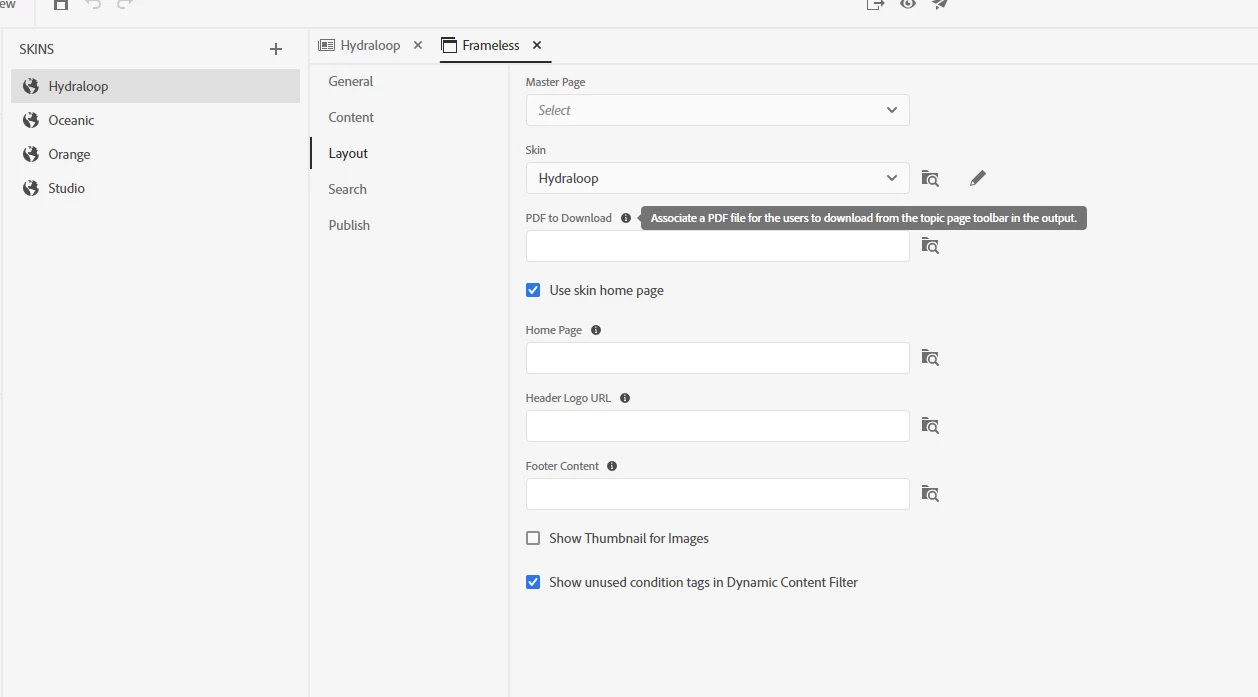
Is it possible to give every topic it's own pdf to download, because if I do this every topic gets the same pdf. 


Have a great day!

    This topic has been closed for replies.

    2 replies

    Legend
    May 31, 2022

    Hello!

    If you want the exact content of what is shown to the user, you can just use the "print" functionality embedded in the frameless output. This button is part of the default skins and usually displayed on top of each Mini-TOC in your topics:

    However, there is a bug in the current version cutting off the last couple of lines of the print for topics > 1 page. I already created a bug for this.

    Another option would be the print functionality of the respective browser. Just use the browser menu - Print - Save as PDF.

    Peter Grainge
    Community Expert
    Community Expert
    May 31, 2022

    If you use the field you have shown, the skin will have a link to whatever PDF you specify there.


    To achieve what you want you need to add a link in each topic to the PDF for that topic.

    ________________________________________________________

    My site www.grainge.org includes many free Authoring and RoboHelp resources that may be of help.


    Use the menu (bottom right) to mark the Best Answer or Highlight particularly useful replies. Found the answer elsewhere? Share it here.