

Question
Drop-down Text Editor Ruler Issue
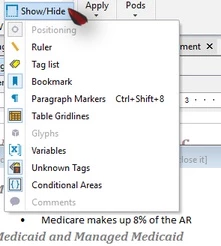
On RH 13.0.0.257 (and previous versions, as I recall), using the drop-down text editor, I have to explicitly go to Show/Hide and click Ruler for the ruler to display in the drop-down text editor for that particular parent topic. If the topic is closed and reopened, the ruler goes away. If a different topic is opened, I have to go through the same process to get the drop-down text editor ruler back for that topic. That is tedious, to say the least.
Is there any way to set the ruler to show by default? Ruler is set to show for the project and always displays in topics, but does not pass through to the drop-down text editor.
Thanks!
Edit: Adding the Ruler to the Quick Access Toolbar does reduce significantly the number of mouse clicks. Still...


 AdChoices