


Participant
November 22, 2021
Question

Drop-down text within microcontent is appearing twice and expanded by default

  • November 22, 2021
  • 1 reply
  • 173 views

We have a RoboHelp 2020 project with multiple microcontent files. A few responses to intents withn the microcontent files contain instances of drop-down text. In our Frameless output (using the studio skin), things were appearing okay so far. However, since today morning, when we're searching for any term whose response contains drop-down text, the drop-down hotspots are showing up twice, and expanded by default. Here's an example:
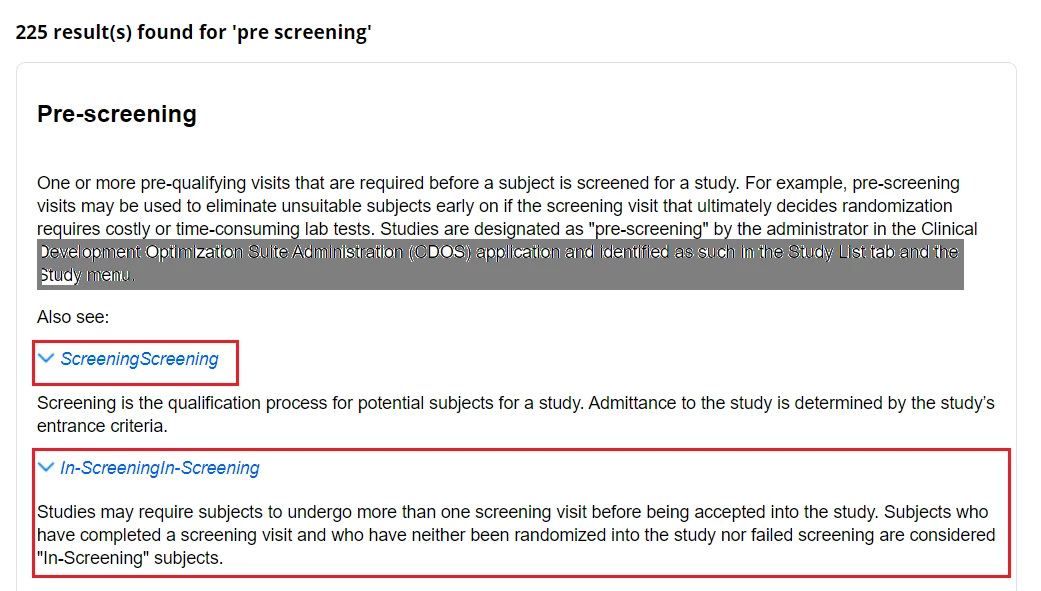
When we click the drop-down hotspot, it behaves abnormally (doesn't collapse and scrolls the page to the top). After a while, it get backs to normal.

Everything looks good in the source. The preview appears good. We've also tried clearing the browser (both Chrome and Edge) cache. Nothing worked.

Has anyone experienced this behavior in the microcontent-based search results? Any thoughts/pointers?

    This topic has been closed for replies.

    1 reply

    Peter Grainge
    Community Expert
    Community Expert
    November 22, 2021

    Not something I have seen reported.


    First of all does the code look OK? I am guessing it does as it has worked and it settles down.


    I would trash everything in the folder on the server and publish again.


    Maybe you have a backup a day or two older that didn't have this behaviour?


    Sorry but there's not much else I can suggest other than Support. See https://helpx.adobe.com/contact/enterprise-support.other.html#robohelp for your Adobe Support options. The email link tcssup@adobe.com is recommended as it reaches a team dedicated to Technical Communication Suite products including RoboHelp. 

    ________________________________________________________
    See www.grainge.org for free Authoring and RoboHelp Information

    Use the menu (bottom right) to mark the Best Answer or Highlight particularly useful replies. Found the answer elsewhere? Share it here.
    DivyaUAuthor
    Participant
    November 22, 2021

    Thanks for the suggestions, Peter. Yes, the code looks good. I do have backups, so I can check one of them and see if the same behavior shows up.

    Let me try those options. If nothing works, I'll check with the Adobe support. Thanks!