
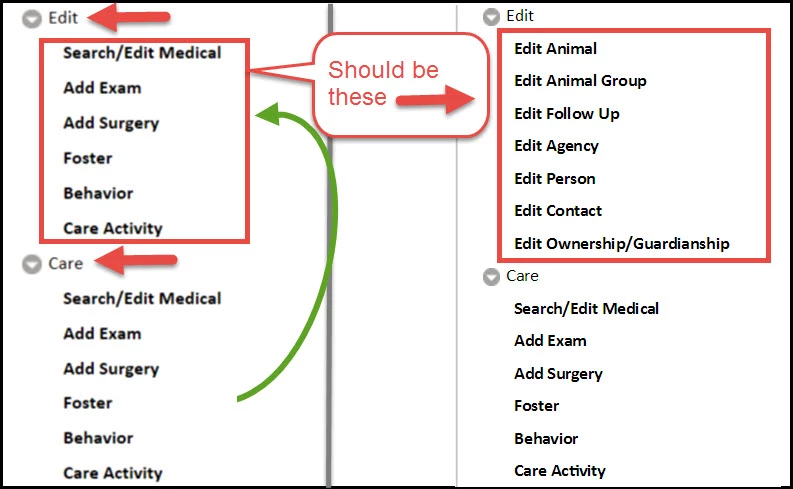
Duplicate sections throughout TOC after generating multiscreen HTML5 output
Using: RoboHelp 10, version 10.0.0.287
Steps to reproduce issue:
1. Click File > Generate > Primary Layout (Multiscreen_HTML5)
2. In Generate window click [Save and Generate]
3. Wait
4. Click [View Results]
5. Results show entire sections of the TOC duplicated in other sections. Its taking 10 plus times to repeat the generation before all of the TOC items are correct and I can publish. It's not stopping me from getting the job done, but it's certainly a time killer.
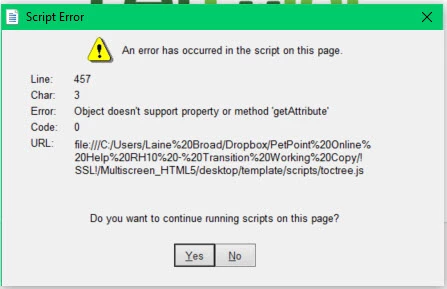
Background: I inherited a working version. I did not create it. I have more than basic knowledge of HTML, but I'm not a developer. I do not have the option to upgrade beyond RH10. I have researched this multiple times, but have not been able to find any fix. The only other thing I have seen occasionally are error messages related to toctree.js file, but I don't always get those. Even when I don't, this still happening, but I have included that error just in case it may be related, although I suspect it is a separate issue. I don't currently have the corresponding line in the js file because this sample is old and I haven't seen the issue in at least a month.
Other Notes: I've seen some posts about a similar issue in the printed version but, I am not doing a printed version. I don't know if that makes any difference, nor do I know if anyone in the past set that up or even where to go to look.


 AdChoices