
Participating Frequently
Apr 22, 2022 12:56 PM UTC
Question

Dynamic Content Filters- to the left in Output

Hi,

For my project, I need to position the Dynamic Content Filtes (DCF) first on the left.

At the moment the default setting is that the TOC is taking the first position to the left, but I wish my project to have DCF on the left followed by TOC next to it (to the right of DCF).
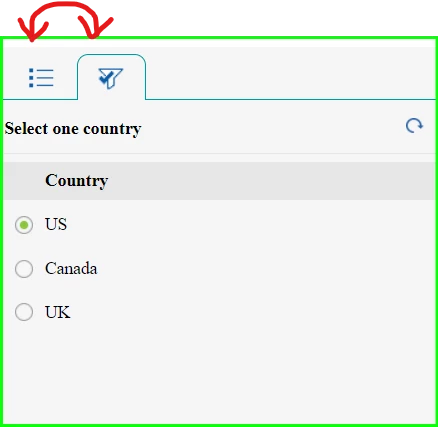
Thanks in advance for your feedabck.

Luke

    This topic is closed to new replies. Start a new post to keep the conversation going.

    6 replies

    Community Expert
    Apr 26, 2022 12:14 AM UTC

    You could try adding this as a custom css, given that you only have two buttons (if you have more than 2, the results might not be what you want). But to make that tab active on first use would require javascript - once your users have used it once, it should then be the default tab, at least until you clear your cookies or close the help with a different tab active.


    div.nav {
        display: flex;
        flex-direction: row-reverse;
        justify-content: flex-end;
    }


    Translate
    Participating Frequently
    May 4, 2022 5:21 AM UTC

    Thanks for the solution. It sounds promising, however, I am now going to try out the frameless output.

    Translate
    Jeff_Coatsworth
    Community Expert
    Community Expert
    Apr 25, 2022 12:19 PM UTC

    Are you on patch 7? I don't know if that control positioning is exposed in the Presets - I suspect that you'll need to dive into the coding driving the output.

    Translate
    Jeff_Coatsworth
    Community Expert
    Community Expert
    Apr 22, 2022 1:17 PM UTC

    Point version of RH? (always lead with that one)
    What skin/preset/output are you using?

    Translate
    Participating Frequently
    Apr 22, 2022 1:26 PM UTC

    Adobe RoboHelp 2020 and skin Azure_Blue

    Translate
    Participating Frequently
    Apr 25, 2022 9:33 AM UTC

    + responsive HTML5

    Translate